

Hi3D V1.0 is an AI-powered 3D geometry refinement model designed to improve the detail and structure of existing 3D objects. Built on the technology associated with Sparc3D, it aims to help developers and digital creators produce more detailed 3D models from an initial mesh and a reference image.
Creating a high-quality 3D object can take hours of modeling, editing, and repeated adjustments. AI 3D modeling tools can reduce some of this manual work, although the quality of the result still depends on the input, the workflow, and the intended use.
With Hi3D V1.0, creators can explore high-resolution geometry, experiment with image-conditioned refinement, and investigate open-source AI workflows. Understanding its capabilities and hardware requirements can help you decide whether this technology fits your creative or development projects.
What Is Hi3D V1.0?
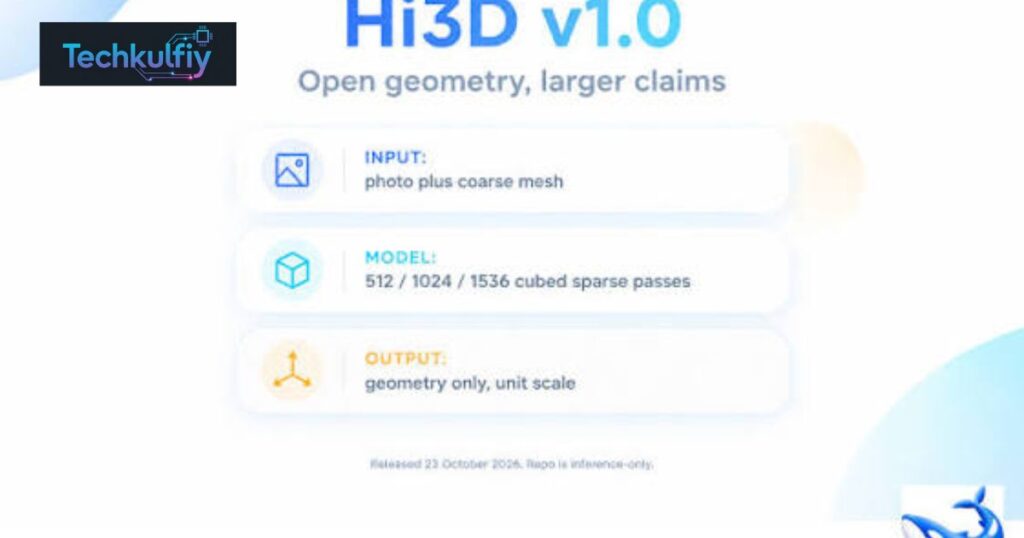
Hi3D V1.0 is an AI model designed to refine the geometry of an existing 3D mesh using a reference image of the same object. It builds on the representation and refinement approach associated with Sparc3D, focusing on adding structural detail to a coarse 3D model rather than simply creating a finished, textured object from nothing.
This distinction matters because 3D model generation and 3D geometry refinement solve related but different problems. A generation system creates an initial object from an image or another input. A refinement system takes an existing shape and attempts to improve its surface structure and finer details.
For example, imagine that a designer has a basic 3D model of a decorative chair. The overall shape may be recognizable, but the legs, curved edges, and ornamental features might look too simple. An AI refinement workflow can use the reference image to improve the mesh’s geometry and produce a more detailed result.
Hi3D V1.0 is particularly relevant to people researching AI-powered 3D design, computer graphics, and automated content creation. Developers can investigate its model weights and inference code, while researchers can study how image information guides the refinement of a 3D shape.
However, it is important to understand what the model does and does not provide. The released refinement implementation focuses on geometry. A detailed surface does not automatically mean that an object has realistic colors, materials, lighting, or animation.
How Hi3D V1.0 Works
The basic idea behind Hi3D V1.0 is to combine an existing coarse mesh with visual information from a reference image. The model then progressively refines the geometry to create a more detailed 3D surface.
A coarse mesh is an early representation of an object. It may capture the object’s overall silhouette while lacking small features, precise curves, and complex surface structures. Refinement attempts to improve these characteristics without requiring the artist to rebuild every part manually.
The process involves several stages.
First, the workflow receives a reference image and a compatible coarse mesh. The image provides visual clues about the object’s appearance, while the mesh supplies its existing 3D structure. Both inputs matter because a single image cannot reveal every surface of an object.
Next, the model uses image features and the mesh’s spatial structure to guide its predictions. Its sparse representation helps the system focus computation on occupied regions instead of treating the entire 3D space as equally important.
The model then progressively samples internal representations, decodes them into geometric information, and extracts a refined mesh. Additional refinement passes can increase the effective extraction resolution.
This process is designed to recover fine geometric details, including surface relief, curved boundaries, and other small structural features that may be missing from a rough starting model.
The final result is a geometry-focused 3D object that can be exported for further work. Artists and developers may still need to repair topology, adjust proportions, create materials, or prepare the object for a specific application.
In simple terms, Hi3D V1.0 is intended to help transform a basic 3D shape into a more detailed one by combining existing geometry with image-based guidance.
Key Features of Hi3D V1.0
Hi3D V1.0 offers several capabilities that may interest people working with AI 3D modeling tools and automated content pipelines.
One important feature is progressive geometry refinement. Rather than relying on a single refinement step, the pipeline can run multiple passes to improve the mesh progressively. The supported extraction settings include 512, 1024, and 1536 grid resolutions, with higher settings using additional passes.
Another important feature is image-conditioned modeling. A reference image helps guide the geometry refinement process. This can be useful when the creator wants the output to remain visually related to a particular object instead of producing an unrelated shape.
The project also provides access to model weights and inference code. This allows technically experienced users to investigate local deployment instead of treating the model solely as a hosted service.
The implementation uses sparse representations and a specialized decoding process to work with complex geometry. Sparse processing can help direct computational effort toward relevant areas, although it does not remove the need for suitable hardware.
A further advantage is compatibility with common mesh workflows through its Python interface. The documented pipeline can return a mesh that users can export to a format such as GLB for use in compatible 3D applications.
These capabilities make Hi3D V1.0 worth investigating for 3D asset refinement, prototyping, research, and technical experimentation. Nevertheless, a higher resolution setting should not automatically be interpreted as a guarantee of better results for every object.
Hi3D V1.0 and Sparc3D: What Is the Connection?
The relationship between Hi3D V1.0 and Sparc3D is important because the names can appear separately in technical discussions.
Hi3D V1.0 builds on the Sparc3D representation and refinement architecture. The released Python package retains the names sparc3d and Sparc3DPipeline for compatibility. Developers may therefore encounter the Sparc3D name when reading the code or following installation instructions.
The newer release makes its refinement implementation and model artifacts available for developers to inspect and use under the applicable license terms. The public materials describe a training dataset of approximately two million curated 3D assets.
However, the availability of inference code and weights should not be confused with the release of every component used during research and development. The published repository does not include the training code or the evaluation harness described as necessary for reproducing the paper’s comparative results.
For developers, this means that the release provides a starting point for running the refinement model and building compatible workflows. Researchers who want to reproduce all training experiments may need additional information and resources.
The relationship also helps explain why older references to Sparc3D may use different descriptions from newer Hi3D V1.0 materials. Before installing a package or following a tutorial, check that its instructions match the specific model artifacts and software version you intend to use.
Understanding this distinction can save time when troubleshooting AI model compatibility, Python packages, and inference scripts.
Hi3D V1.0 Resolution Options Explained
Resolution is one of the most important technical details when evaluating Hi3D V1.0. Its documented refinement pipeline supports nominal extraction-grid settings of 512, 1024, and 1536.
These values describe the grid resolution used during the refinement process. They do not represent a guaranteed polygon count, a texture resolution, or a promise that every surface will contain the same amount of detail.
| Resolution setting | Refinement passes | General purpose |
|---|---|---|
| 512 | 1 | Initial geometry refinement |
| 1024 | 2 | More detailed geometry refinement |
| 1536 | 3 | Highest documented refinement setting in this pipeline |
A lower setting can be useful when testing the pipeline or checking whether the input mesh is suitable. A higher setting may reveal additional surface detail, but it can also require more computational resources.
The quality of the starting mesh remains important. If an input model has the wrong proportions, a missing section, or a severely distorted structure, additional refinement may not completely correct the problem.
The reference image also affects the outcome. A photograph with clear edges and useful lighting may provide stronger visual information than a blurry image with substantial occlusion.
Users should also avoid confusing 3D geometry resolution with overall asset quality. A detailed model may still have unsuitable topology, incorrect scale, or surfaces that need manual cleanup.
For practical projects, test the lowest appropriate setting first. Inspect the output, compare it with the reference, and increase the resolution only when the extra detail serves a clear purpose.
Hardware and System Requirements
Although Hi3D V1.0 provides publicly accessible model artifacts, running the refinement pipeline locally requires a suitable technical environment.
The documented setup uses Linux, Python 3.10, a compatible NVIDIA GPU, and a CUDA toolkit within the specified supported range. The published installation instructions do not provide a CPU-only inference path.
This requirement makes the model different from lightweight browser-based AI tools. Users generally cannot assume that an ordinary laptop or office computer will run the full pipeline successfully.
The highest documented refinement setting has been validated on a high-memory NVIDIA H20 GPU with 96 GB of memory. The available technical documentation does not establish a reliable minimum GPU-memory requirement for every lower-end device.
Sequential CPU offloading is available to reduce how much model data remains resident in GPU memory. However, offloading does not eliminate every memory requirement, and it should not be treated as proof that the model will run on any graphics card.
The installation process can also involve compiling specialized components and preparing compatible machine-learning libraries. Mismatched CUDA, PyTorch, or attention-kernel versions can cause errors even when the computer has a powerful GPU.
Before attempting a local installation, developers should verify their operating system, Python version, graphics hardware, CUDA configuration, and available storage.
For people without compatible hardware, an online demo may be a more convenient starting point if the service remains available and its current usage terms meet their needs.
How to Use Hi3D V1.0 in a 3D Workflow
The exact workflow depends on whether you are using a hosted interface or running the model locally. The local inference implementation is primarily intended for users who are comfortable working with Python and GPU-based machine learning.
Start by preparing a suitable reference image. The image should show the object clearly and provide useful visual information about its shape. Background clutter, heavy shadows, and objects covering important features can make the reference less informative.
Next, prepare a compatible coarse mesh. The mesh should represent the same object shown in the image. A large mismatch between the photograph and the starting geometry can limit the quality of the refined result.
Install the required software environment according to the project’s instructions. This includes the supported Python and CUDA setup, required libraries, and the model artifacts. Developers should follow the current repository documentation instead of copying installation commands from an unrelated version.
After preparing the environment, load the model and provide the reference image and coarse mesh to the inference pipeline. Choose a suitable resolution and run the refinement process.
When processing finishes, inspect the generated mesh. Check the silhouette, small features, surface continuity, and areas that were hidden from the reference view. Do not assume that every part of the output is an exact reconstruction.
Finally, export the mesh into a compatible format and open it in your preferred 3D application. Depending on the intended use, you may need to adjust the scale, repair geometry, create materials, add textures, or optimize the model.
A successful workflow combines AI-assisted refinement with human review. This approach can save time on some tasks while preserving control over the final asset.
Practical Uses of Hi3D V1.0
The potential applications of Hi3D V1.0 extend across several fields that rely on detailed digital objects. Its usefulness depends on whether geometry refinement addresses a real problem in the user’s workflow.
In game development, artists can investigate AI-assisted methods for improving rough props and environmental assets. A refined object may serve as a starting point for further modeling, but game-ready assets still need appropriate topology, performance optimization, materials, and collision geometry.
In product visualization, designers may use refined models during concept development. Better surface detail can make an early design easier to inspect or present. However, products that require exact measurements and manufacturing tolerances need accurate source data and professional verification.
For 3D printing, detailed geometry may help creators explore physical models, decorative objects, and prototypes. Yet a refined mesh is not automatically ready to print. Users must check for watertight geometry, wall thickness, disconnected parts, scale, and printer compatibility.
In digital art, the model may support experimentation with sculptures, decorative shapes, and complex surface forms. Artists can use the result as a base for additional sculpting and artistic adjustments.
In research and education, publicly accessible model artifacts can provide an opportunity to study image-conditioned refinement and sparse 3D representations. Students and developers can explore how machine-learning systems process spatial data, provided they have access to the required hardware and technical skills.
These are potential use cases rather than guarantees of performance. Each project should be evaluated with representative inputs and clear quality requirements.
Benefits and Limitations of Hi3D V1.0
One advantage of Hi3D V1.0 is that it focuses on improving existing geometry. This can be useful when a basic mesh already captures the right overall structure but lacks important details.
Access to model weights and inference code also gives developers more control over experimentation. Instead of relying exclusively on a hosted service, technically capable users can investigate local deployment and integration into their own software pipelines.
The progressive refinement approach provides multiple resolution choices, allowing users to balance detail against computational demands. The model’s image conditioning also offers a way to guide refinement using visual evidence.
However, several limitations deserve attention.
First, the released refinement model produces geometry-focused output. It does not automatically provide a fully textured, animated, production-ready asset.
Second, a reference image contains incomplete information about the object’s hidden surfaces. The model may generate plausible geometry where direct visual evidence is missing, but plausible completion is not the same as accurate reconstruction.
Third, severe problems in the starting mesh may remain after refinement. A refinement model should not be treated as a universal replacement for skilled 3D modeling.
Fourth, local inference requires a supported GPU environment and may demand substantial memory, particularly at higher settings. The available documentation does not establish that every consumer graphics card can run the highest resolution.
Finally, the project’s licensing terms require careful review, especially for commercial deployments. Developers should understand the applicable model license, attribution requirements, and any conditions relevant to their intended use.
A realistic evaluation should consider the entire workflow rather than judging the model by a single impressive render.
Hi3D V1.0 vs. Traditional 3D Modeling
Traditional 3D modeling software gives artists direct control over vertices, edges, faces, sculpting, and other geometry-editing operations. Skilled artists can create precise forms and adjust every detail, but complex work may require considerable time.
AI-based refinement offers a different approach. Instead of manually editing every surface feature, users can provide a coarse mesh and a reference image and allow the model to generate a more detailed geometry result.
This can be helpful during early production stages, when teams need to explore multiple concepts quickly. It can also support artists who want to improve a starting asset before moving into manual editing.
However, these approaches are not mutually exclusive. Many practical workflows combine automated processing with conventional modeling tools.
For example, an artist could prepare an initial mesh, refine its geometry using an AI model, and then open the result in a 3D editor. The artist could correct errors, optimize topology, add textures, and prepare the object for the final application.
Traditional modeling remains important when a project requires exact dimensions, controlled topology, predictable deformation, or precise engineering geometry.
AI-assisted 3D modeling is best understood as an additional tool rather than a complete replacement for established creative software.
Who Should Try Hi3D V1.0?
Hi3D V1.0 may interest several groups of users, although the benefits will differ depending on their experience and equipment.
Developers who build 3D creation tools may find the publicly available inference code useful for experimentation. They can study the interface, test different inputs, and explore whether geometry refinement fits their applications.
Technical artists may be interested in evaluating how AI-generated geometry behaves when moved into an established production workflow. They should pay particular attention to mesh cleanup and the amount of manual editing required after refinement.
Researchers and students can explore the model’s approach to sparse representations and image-conditioned geometry. However, the hardware requirements may make large-scale experiments difficult for people without access to suitable computing resources.
Indie game developers and digital artists may benefit from experimenting with the technique when they have a compatible starting mesh and a clear reference image. The model could be useful for prototyping, but output quality should be tested before adopting it for regular production.
Beginners who want a simple, one-click creative experience may prefer a hosted tool with an easy interface. Running the open-source implementation locally involves considerably more setup than using a typical web application.
Before investing time in installation, define the task you want to solve. If you need more detailed geometry from an existing mesh, the model may be worth evaluating. If you need exact engineering measurements, complete textures, or guaranteed print-ready geometry, additional tools and manual checks will likely be necessary.
Frequently Asked Questions
What is Hi3D V1.0?
Hi3D V1.0 is an AI model that refines an existing 3D mesh using a reference image of the same object. It builds on the representation and refinement approach associated with Sparc3D and focuses on improving geometry.
Is Hi3D V1.0 related to Sparc3D?
Yes. Hi3D V1.0 builds on the Sparc3D approach, and its Python package retains names such as sparc3d and Sparc3DPipeline for compatibility.
Can Hi3D V1.0 create a 3D model from a single image?
The documented refinement pipeline takes both a coarse mesh and a reference image. A separate coarse-generation stage is needed if you want to start with an image and have no existing mesh.
Does Hi3D V1.0 generate textures automatically?
The released refinement pipeline focuses on geometry and does not generate textures, materials, or vertex colors as part of its core output. Additional tools are needed for those tasks.
Is Hi3D V1.0 free to use?
The code and model artifacts are publicly available, but users should read the applicable license terms before using or distributing them. Public availability does not mean that every possible use is unrestricted.
What GPU is required for Hi3D V1.0?
The documented setup requires a compatible NVIDIA GPU and CUDA environment. The highest refinement setting has been validated on a 96 GB NVIDIA H20, while minimum memory requirements for smaller GPUs are not firmly established in the available documentation.
Can beginners use Hi3D V1.0?
Beginners can explore a hosted demonstration if one is available. Local installation is more technical because it requires Python, compatible GPU libraries, model files, and familiarity with 3D meshes.
Is Hi3D V1.0 suitable for 3D printing?
It may help create more detailed geometry, but the output needs inspection before printing. Users should verify mesh integrity, wall thickness, scale, and other printer-specific requirements.
Does a higher resolution always produce a better 3D model?
No. Higher settings can support more detailed geometry, but the result also depends on the starting mesh, reference image, and structure of the object. More resolution does not guarantee greater accuracy.
Can Hi3D V1.0 replace traditional 3D modeling software?
No. It can assist with geometry refinement, but conventional software remains valuable for editing, topology repair, texturing, animation, and preparing production-ready assets.
Conclusion
Hi3D V1.0 is an interesting development in AI-powered 3D modeling because it focuses on refining existing geometry rather than treating every task as a completely new generation problem. Built on the Sparc3D approach, it combines a coarse mesh with reference-image information and progressively refines the resulting surface.
Its documented resolution options, accessible model artifacts, and inference implementation give developers and researchers opportunities to experiment with high-resolution 3D geometry. Artists may also find the approach useful when they need to improve a rough asset before further editing.
However, the technology has practical limitations. It requires compatible computing hardware for local inference, does not automatically produce complete textured assets, and cannot guarantee that hidden surfaces or complex structures will be reconstructed accurately. Commercial users must also review the relevant licensing terms.
For creators considering this technology, the best approach is to test it with a representative mesh, compare the result with the reference image, and evaluate how much additional cleanup the output requires. Hi3D V1.0 may become a useful part of an AI-assisted creative workflow, but its real value depends on the quality of its results and how well those results fit the needs of a particular project.
