

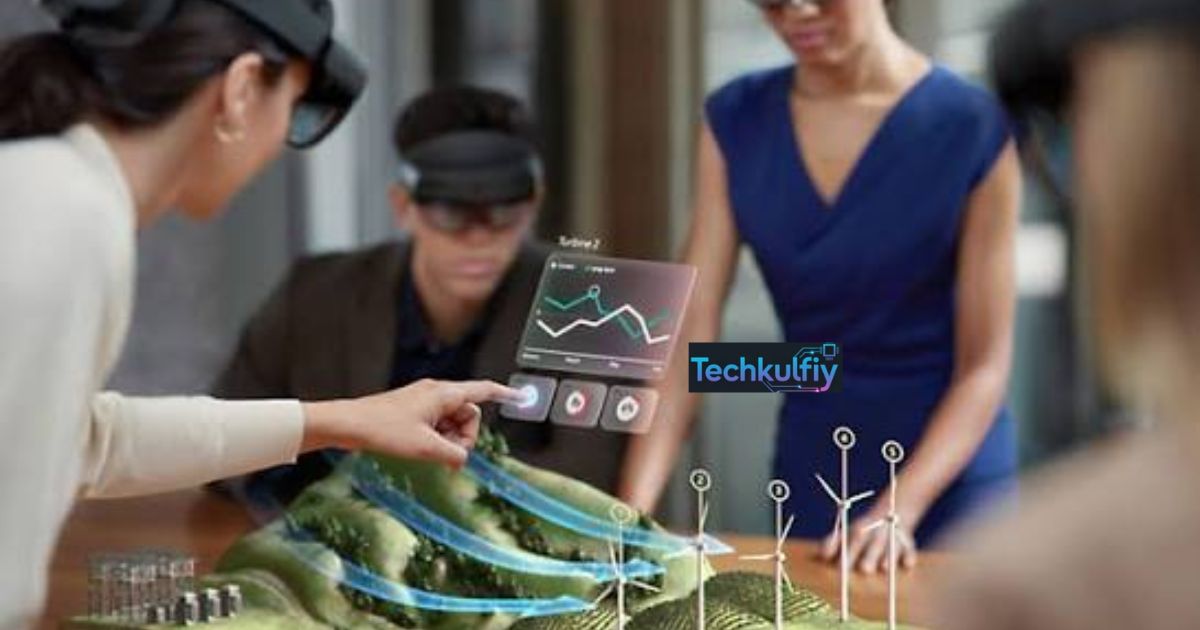
Augmented reality is a technology that adds digital content to the real world. It combines virtual objects with your physical environment. You can experience AR through phones, glasses, and other smart devices.
Imagine seeing digital information appear right in front of you. A simple camera can turn your surroundings into an interactive experience. From games to shopping, augmented reality makes everyday activities more engaging.
Today, augmented reality is used in many different fields. Businesses use it for shopping, training, and marketing. Education, healthcare, gaming, and navigation also benefit from AR technology.
What Is Augmented Reality (AR)?
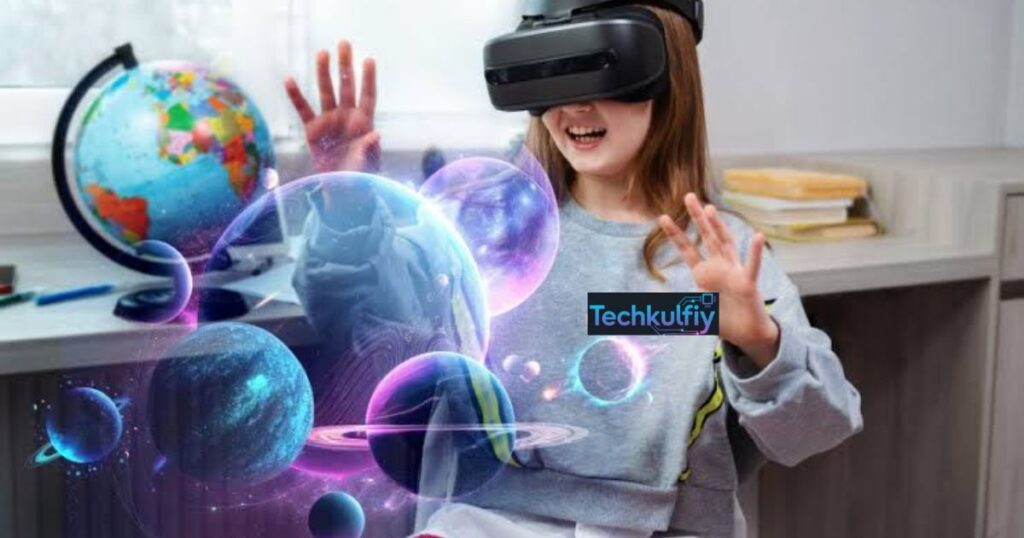
So, what is augmented reality in practical terms? Augmented reality is a technology that combines the real-world environment with computer-generated elements. Your physical surroundings remain visible while software places digital content over, around, or alongside them. That content might be text, an image, an animation, a sound, a 3D object, or useful directions. The result is a real-world digital overlay that responds to the environment and, in many cases, to your movements.
The main idea behind augmented reality technology is enhancement rather than replacement. Virtual reality creates a completely digital experience and usually blocks out your physical surroundings. AR takes the opposite approach. You continue seeing your room, street, store, workplace, or classroom while additional digital information appears within that space. This difference makes AR especially useful for tasks where you need to interact with both physical and digital information at the same time.
How Is Augmented Reality Different From Digital Content?
Ordinary digital content usually exists on a screen without understanding the surrounding physical space. You might watch a video, read a webpage, or view a photograph, but the content remains inside the boundaries of the display. Augmented reality changes this relationship by connecting digital content with your physical environment.
For example, a normal shopping website can show you a picture of a sofa. An AR application can use your augmented reality camera to show a 3D version of that sofa inside your actual living room. You can move around it, change its position, and judge whether its size and appearance suit the room. This makes AR more interactive because the software connects computer-generated content with the real world.
What Devices Support Augmented Reality?
Modern augmented reality devices range from smartphones and tablets to specialized AR glasses, smart glasses, and head-mounted systems. Smartphones are currently one of the easiest ways to experience AR because they already contain cameras, motion sensors, processors, displays, and wireless connections.
A typical mobile AR system uses the camera to observe the surroundings while AR sensors help understand movement and orientation. More advanced systems can combine cameras with depth sensors and other hardware. AR glasses take the concept further by placing digital information closer to your natural field of view. Instead of holding a phone in front of your face, you can potentially see instructions, navigation information, or notifications while keeping your hands free.
Why Is Augmented Reality Becoming More Popular?
AR is becoming more useful because smartphones have become powerful enough to perform complex visual calculations in real time. Better cameras, faster processors, improved computer vision, and more accurate sensors have made mobile AR considerably more capable than early AR systems.
Another reason is practical value. Businesses can use AR to help customers visualize products before purchasing them. Doctors can use AR-assisted systems to understand complex information. Technicians can receive instructions while working. Students can explore three-dimensional objects instead of relying only on flat textbook images. These applications demonstrate why AR is gradually becoming more than a novelty.
How Does Augmented Reality Work?
Understanding how augmented reality works requires looking at several technologies working together. At its core, AR must determine where the device is, understand what surrounds it, decide where digital content should appear, and then display that content with enough accuracy to look connected to the physical world.
The process usually begins with cameras and sensors. The camera captures information about the surroundings, while motion sensors measure how the device moves. Accelerometers can detect changes in movement, while gyroscopes measure rotation and orientation. Many AR systems also use GPS when location is important. Software then combines these signals to estimate the device’s position and understand the environment.
Sensing and Tracking
Sensing and tracking are fundamental parts of how AR technology works. Before a digital object can appear convincingly in a room, the system needs to understand how the device is moving. If you move your phone to the left, the virtual object should remain in the correct position rather than sliding across the screen.
This process is known as real-time tracking. Modern AR systems continuously analyze camera frames and sensor information to estimate movement. The system can track surfaces, points, objects, or geographic locations depending on the application. Accurate tracking creates a stable AR experience, while poor tracking can make digital elements jump, drift, or disappear.
Environment Recognition and Computer Vision
Computer vision gives an AR system the ability to interpret visual information. The software examines camera images to identify surfaces, shapes, objects, patterns, and movement. This is where augmented reality computer vision becomes especially important.
For example, an AR furniture app may identify the floor before placing a virtual chair. An industrial application might recognize a machine component and display maintenance information beside it. This process can involve object recognition, surface detection, depth estimation, and spatial mapping. More advanced systems can build a detailed understanding of the surrounding space and maintain that understanding as the user moves.
Rendering and Displaying Digital Content
Once the system understands the environment, it must place the digital elements correctly. This stage is called AR rendering. The software calculates how a digital object should look from the user’s current viewpoint.
Suppose an AR app places a virtual table on your floor. As you walk around it, the table must change perspective naturally. Its position should remain anchored to the floor, and its proportions should appear consistent. This requires continuous calculations involving the camera position, lighting, perspective, and object geometry.
Modern augmented reality 3D models can contain detailed textures, animations, and interactive components. The better the rendering and tracking, the more convincing the experience becomes.
User Interaction in AR
The final part is interaction. AR interaction allows users to control or respond to digital elements. Depending on the device, interaction can happen through touchscreens, gestures, voice commands, eye movements, controllers, or physical movement.
For example, you might tap a virtual chair to change its color, rotate it with your fingers, or move closer to inspect its details. In industrial settings, a worker might look at a machine and select a digital instruction. This makes interactive augmented reality different from simply watching an animation because the digital layer responds to the user’s actions.
What Are the Different Types of Augmented Reality?
The types of augmented reality differ mainly in how they identify the environment and determine where digital content should appear. Some AR systems rely on physical markers. Others understand surfaces without markers. Location-based systems use geographic information, while projection-based systems project digital visuals onto physical surfaces.
Marker-Based Augmented Reality
Marker-based augmented reality, often called marker-based AR, uses a recognizable image, symbol, QR-style pattern, or other visual marker to trigger digital content. The camera scans for the marker and then places the relevant digital information in relation to it.
For example, a museum exhibit might contain a special image. When visitors point an AR app toward it, a 3D animation appears above the exhibit. The marker provides a clear reference point, making the system easier to control in predictable environments.
Markerless Augmented Reality
Marker-less augmented reality, also called marker-less AR, does not require a special printed marker. Instead, the system uses cameras, sensors, computer vision, and spatial understanding to identify surfaces and surroundings.
A home-design application is a common example. You can point your phone toward an empty floor, and the software can detect the surface and place virtual furniture there. Markerless systems are more flexible because users do not need to position a specific image or object first.
Location-Based Augmented Reality
Location-based AR connects digital information to a geographic position. These systems often use GPS, compass information, cameras, and motion sensors to determine where the user is.
AR navigation is a strong example. A navigation app can place directional information over a live camera view, helping you understand where to walk. Tourism applications can also display information about nearby landmarks when you point your phone toward a particular location.
Projection-Based Augmented Reality
Projection-based AR uses light or projectors to place digital visuals onto physical surfaces. Instead of requiring users to look through a conventional screen, the technology can transform walls, tables, products, or other surfaces into interactive displays.
This approach has potential in manufacturing, design, exhibitions, education, and entertainment. It can also create collaborative experiences where several people view the same projected information at once.
What Are Some Examples of Augmented Reality?
There are countless augmented reality examples around you. Some are designed for fun, while others solve genuine business or everyday problems. The most familiar examples include social media filters, AR games, navigation tools, virtual furniture, product visualization, and educational applications.
AR Filters on Social Media
Social media filters are among the most widely used forms of augmented reality apps. A camera can recognize a person’s face and place digital effects over facial features. The filter may add glasses, makeup, masks, animated objects, or other visual elements.
Although these applications are entertaining, they demonstrate several important AR technologies. The system needs face detection, tracking, image processing, and real-time rendering. The filter must also update as the user’s head moves.
Pokémon GO and AR Gaming
AR gaming showed millions of people that digital characters could appear to exist in the physical world. Players can use their smartphones to see game elements through the camera while moving through real locations.
This type of augmented reality in gaming combines location data, cameras, sensors, digital graphics, and interactive software. It also demonstrates how AR can encourage physical movement and exploration instead of keeping players inside a purely digital environment.
AR Navigation
Augmented reality in navigation can make directions easier to understand by connecting digital instructions with the street around you. Instead of reading a traditional map, you may see arrows or labels over the camera view.
This approach can be especially useful in unfamiliar areas. A digital arrow can indicate the correct direction while nearby landmarks provide additional context. In airports, shopping centers, campuses, and tourist destinations, AR can potentially make wayfinding less confusing.
Virtual Furniture Placement
Furniture retailers use AR to let customers visualize products in their homes. The user opens an app, points the camera at the room, and places a digital sofa, table, bed, or cabinet within the scene.
This is an excellent example of virtual product visualization. Instead of imagining how an item might look, you can see a realistic representation at approximately the correct scale. This can make purchase decisions easier and reduce uncertainty.
Virtual Try-On Experiences
Beauty, fashion, eyewear, and accessories companies increasingly experiment with virtual try-on tools. A customer can use a camera to see how glasses, makeup, clothing, or other products might look.
An AR virtual try-on experience combines computer vision with digital product models. The system needs to understand the user’s face or body and position the digital product accurately. Better tracking can make the result feel much more natural.
AR Learning and Educational Experiences
AR education can turn abstract concepts into interactive visual experiences. A student studying the human body might examine a three-dimensional anatomical model. A science learner might explore a virtual solar system. A history class could use AR to visualize historical buildings or artifacts.
This makes augmented reality in education particularly valuable when spatial understanding matters. Instead of only reading about an object, students can interact with a representation of it.
What Is Augmented Reality Used For?
The augmented reality applications landscape continues to expand because AR can connect digital instructions with physical tasks. Its usefulness becomes particularly clear when people need information while looking at or interacting with something in the real world.
Augmented Reality in Education
Augmented reality in education can support visual learning, practical training, and interactive exploration. Traditional textbooks are excellent for explanations, but some subjects are easier to understand when students can see and manipulate three-dimensional information.
For example, an AR biology application could display a 3D model of the heart. Students could rotate the model, examine its chambers, and view labels. The technology does not replace the teacher or textbook. Instead, it adds another layer of explanation.
Augmented Reality in Healthcare
AR healthcare applications can support training, visualization, navigation, and access to information. Medical students can study anatomy through three-dimensional models, while healthcare professionals may use digital overlays to access relevant information during certain procedures or training scenarios.
Healthcare AR requires especially careful design. Accuracy, privacy, reliability, and usability matter because mistakes can have serious consequences. AR should therefore complement professional judgment rather than encourage users to treat digital overlays as unquestionable medical instructions.
Augmented Reality in Manufacturing
AR manufacturing is one of the most practical enterprise applications. Workers can potentially see assembly instructions, component information, maintenance steps, or safety guidance while looking directly at equipment.
A technician repairing a machine could use AR to identify a component and view instructions beside it. This can reduce the need to repeatedly look away from the equipment and consult separate manuals. AR can also support training by allowing new workers to follow visual instructions during controlled exercises.
Augmented Reality in Gaming and Entertainment
Augmented reality in gaming creates experiences where digital characters and objects interact with physical surroundings. Unlike traditional games that keep all graphics inside a screen, AR gaming can make the surrounding environment part of the experience.
Entertainment companies can also use AR for interactive advertisements, live events, attractions, exhibitions, and location-based experiences. This creates a bridge between physical entertainment and digital media.
Augmented Reality in Navigation and Travel
Augmented reality in navigation can help travelers understand directions and locations more naturally. A tourist could point a phone toward a landmark and receive historical information. A traveler inside a large airport might see directional information leading toward a gate.
Travel applications can combine GPS, cameras, maps, and location databases. This makes AR particularly useful when traditional maps feel difficult to interpret.
Augmented Reality in Marketing and Advertising
Brands use AR to make advertising more interactive. Instead of simply seeing an advertisement, customers can interact with a product or experience a virtual demonstration.
For example, a campaign might allow customers to scan packaging and unlock a digital animation. Another campaign might let users visualize a product inside their home. These experiences can increase engagement because the customer becomes an active participant rather than a passive viewer.
How Is Augmented Reality Used in Shopping and E-Commerce?
Augmented reality shopping is changing how customers evaluate products online. Traditional e-commerce often creates a visualization problem. You can see product photographs, but you cannot always understand how the item will look in your own environment.
AR addresses this gap by placing digital representations into the customer’s surroundings. This makes AR commerce especially useful for furniture, home décor, fashion, beauty products, eyewear, and other visually driven categories.
Virtual Try-On
AR virtual try-on allows customers to preview products before buying. A shopper might virtually test a pair of glasses or see how a makeup shade appears on their face.
The biggest advantage is confidence. Customers receive more information before completing the purchase. However, the experience depends heavily on accurate tracking, realistic rendering, camera quality, and appropriate product models.
3D Product Visualization
A traditional product photograph provides a fixed perspective. AR can provide an interactive three-dimensional view.
With augmented reality 3D models, customers can examine an item from different angles and place it within a physical space. This is particularly useful for products where size, shape, and appearance strongly influence purchasing decisions.
Furniture and Home Décor Visualization
Furniture is a natural fit for AR because customers often struggle to imagine how a product will fit into their room.
An AR shopping application can estimate the room surface and place a virtual product over the camera view. The shopper can move around the room and compare different products. This form of virtual product visualization can make online shopping feel more tangible.
AR Store Navigation
Physical stores can also use AR. An application might guide shoppers toward a particular aisle, show product information, or provide interactive promotions.
This creates an AR experience that connects online information with a physical store. Instead of treating e-commerce and physical retail as separate channels, businesses can use AR to create a more connected shopping journey.
| AR commerce application | How it helps customers | Typical technology |
|---|---|---|
| Virtual try-on | Lets customers preview appearance | Camera, computer vision, tracking |
| Furniture visualization | Shows products inside a room | 3D models, surface detection |
| Product visualization | Provides an interactive product view | 3D rendering, mobile AR |
| Store navigation | Helps customers find products | GPS, indoor positioning, AR overlays |
What Are the Advantages of Augmented Reality?
The advantages of augmented reality come from its ability to connect information with context. Instead of forcing you to switch between a physical task and a separate screen, AR can place relevant information directly within your field of view.
Better User Engagement
AR can turn ordinary content into an interactive experience. Customers can explore products, students can manipulate digital models, and gamers can interact with virtual objects in physical spaces.
This level of participation can make experiences more memorable. The user does not simply consume information. They interact with it.
Improved Learning and Training
Visual information can be easier to understand when it appears in context. A trainee repairing a machine may understand an instruction faster when the instruction appears beside the actual component.
This is one reason AR education and industrial training continue to attract interest. AR can connect theoretical information with practical environments.
Better Product Visualization
Online shopping often lacks physical context. AR can reduce this gap by allowing users to see products in their own surroundings.
A customer buying furniture, for example, can check whether the product appears suitable for the room before placing an order. This makes the buying process more informative.
Increased Productivity
In professional environments, AR can reduce unnecessary movement between physical equipment and separate information sources. A worker can potentially see instructions, diagrams, or data while continuing to work.
The value becomes particularly strong when the information changes according to the user’s location or the object being viewed.
More Personalized Experiences
AR can adapt digital content to individual users and environments. A retail application can show products based on the customer’s interests. A navigation system can provide location-specific directions. An educational tool can present interactive information based on the lesson.
This flexibility gives AR a powerful role within the broader field of immersive technology.
What Are the Limitations of Augmented Reality?
Despite its potential, AR is not perfect. The technology still faces technical, financial, privacy, and usability challenges. Understanding these limitations is important when evaluating real-world augmented reality use cases.
Hardware and Development Costs
Advanced AR systems can require expensive hardware, powerful processors, specialized sensors, and sophisticated software. Developing high-quality AR applications can also require expertise in 3D design, computer vision, mobile development, spatial computing, and user experience.
Simple smartphone AR may be affordable, but enterprise-grade systems can require substantial investment.
Privacy and Data Concerns
AR systems can collect information from cameras, sensors, locations, and user interactions. A camera-based application may observe surroundings that contain people, documents, signs, or other sensitive information.
Privacy therefore becomes a major consideration. Developers need clear data practices, strong security, and responsible handling of user information.
Battery and Performance Requirements
Real-time camera processing, sensor analysis, 3D rendering, and computer vision can consume significant processing power. On smartphones and wearable devices, this can affect battery life.
Performance becomes even more important when an application needs continuous real-time tracking while rendering detailed digital objects.
Tracking and Accuracy Issues
AR depends heavily on accurate tracking. Poor lighting, reflective surfaces, fast movement, crowded environments, or limited sensor information can reduce accuracy.
When tracking fails, virtual objects may drift, flicker, or appear in the wrong position. A technically impressive application can therefore become frustrating if its spatial alignment is unreliable.
Limited Device Compatibility
Not every phone or computer supports the same AR capabilities. Hardware differences can affect camera quality, depth sensing, processing performance, and supported software features.
This means developers often need to design different experiences for different AR devices. Compatibility can remain a challenge as the industry moves toward more advanced hardware.
Augmented Reality vs. Virtual Reality vs. Mixed Reality
The terms augmented reality vs virtual reality and augmented reality vs mixed reality often create confusion because all three technologies involve digital content and immersive experiences. The key difference is how each technology treats the physical world.
Augmented reality keeps the physical environment visible and adds digital elements to it. Virtual reality generally replaces the user’s visual environment with a fully digital one. Mixed reality goes further by allowing physical and digital elements to interact within a shared spatial environment.
| Technology | Physical world | Digital content | Typical experience |
|---|---|---|---|
| Augmented reality | Remains visible | Added to the environment | Digital overlay on reality |
| Virtual reality | Mostly replaced | Creates a digital environment | Fully immersive simulation |
| Mixed reality | Visible and spatially understood | Interacts with physical surroundings | Digital and physical elements coexist |
| AR glasses | Visible through lenses | Overlaid within the user’s view | Hands-free AR experience |
AR vs. VR
The main difference in augmented reality vs virtual reality is the treatment of the physical environment. AR enhances what you already see, while VR creates a separate digital environment.
A VR user might enter a virtual museum and look around a completely computer-generated building. An AR user could stand inside a real museum and see digital information appear beside actual exhibits.
Both technologies have valuable applications. VR is particularly useful for simulations and deeply immersive environments, while AR is often better when users need to remain aware of their physical surroundings.
AR vs. MR
The difference in augmented reality vs mixed reality can be subtler. AR often places digital content over the physical world. MR aims for stronger spatial interaction between digital and physical elements.
For example, a basic AR application might display a virtual label above a real machine. A more advanced mixed reality system might allow a digital object to appear behind a physical table, respond to room geometry, and interact with other spatial elements.
The boundaries between AR and MR are not always rigid. Technology companies may use the terms differently, and some devices can support experiences that sit somewhere between conventional AR and mixed reality.
What Is the Future of Augmented Reality?
The future of augmented reality will likely depend on improvements in artificial intelligence, wearable hardware, spatial computing, computer vision, and connectivity. AR is gradually moving from simple smartphone effects toward systems that can understand objects, environments, language, and user intent.
AI-Powered Augmented Reality
Artificial intelligence can make AR systems more aware of their surroundings. Instead of merely recognizing a flat surface, an AI-enabled system could identify objects and understand their context.
Imagine looking at a complex machine through AR glasses. The system could recognize the machine, identify a component, retrieve relevant information, and display instructions in the correct location. This combination of AI and AR could make digital assistance far more contextual.
AR Glasses and Wearable Devices
AR glasses and smart glasses could become increasingly important as hardware becomes lighter and more efficient. Smartphones require users to hold a device, while glasses can potentially provide hands-free information.
For workers, this could mean seeing instructions without stopping a task. For travelers, it could mean viewing navigation information without repeatedly checking a phone. For everyday users, it could eventually mean receiving contextual information while interacting naturally with the surrounding world.
Augmented Reality and Spatial Computing
Spatial computing gives computers a stronger understanding of three-dimensional environments. It combines elements of AR, VR, computer vision, sensors, 3D graphics, and human-computer interaction.
An augmented reality digital twin is one example of where these technologies can become especially powerful. A digital twin is a digital representation of a physical object, system, or environment. AR can potentially allow users to view that digital representation while standing beside the real-world asset.
In manufacturing, a digital twin could represent a machine and its operating information. A technician might view the digital model through an AR device while examining the physical machine.
The Future of AR in Everyday Life
AR may eventually become less noticeable because it could blend into ordinary activities. Instead of opening a dedicated application, users might interact with digital information through glasses, voice commands, gestures, or contextual interfaces.
The long-term goal is not simply to create more impressive visual effects. The real opportunity is to provide useful information exactly when and where it is needed.
Consider a future traveler walking through a new city. Their glasses could recognize a landmark, display its name, translate a nearby sign, show walking directions, and provide historical information. The user would not need to stop and search multiple applications. Digital information could become part of the environment itself.
“The strongest AR experiences are not the ones that add the most digital content. They are the ones that add the right information at the right moment.”
Augmented Reality Case Study: How AR Can Improve Online Furniture Shopping
Consider a customer who wants to buy a large sofa online. A traditional e-commerce website provides photographs, dimensions, colors, and reviews. However, the customer still has to imagine how the sofa will look in the living room.
An AR-enabled shopping experience changes the process. The customer opens the retailer’s app and activates the camera. The application scans the floor and surrounding space using computer vision, sensors, and real-time tracking. It then places a 3D model of the sofa inside the room.
The customer can walk around the virtual sofa, change its position, and compare different colors. This creates a stronger understanding of scale and appearance. The experience does not guarantee that the physical sofa will look identical to the digital representation, but it provides valuable visual context that ordinary product photography cannot offer.
This example explains why augmented reality shopping has strong potential. AR does not simply make an online store more entertaining. It can solve a genuine customer problem: uncertainty about how a product will fit into a physical space.
Key Facts About Augmented Reality
| Fact | Explanation |
|---|---|
| AR stands for augmented reality | It enhances the physical world with digital information |
| AR does not normally replace reality | The real environment remains visible |
| Smartphones can support AR | Cameras, sensors, processors, and displays enable mobile AR |
| Computer vision is important | It helps systems understand visual surroundings |
| GPS can support location-based AR | It connects digital information with geographic locations |
| 3D models are widely used | They allow digital objects to appear within physical spaces |
| AR glasses can provide hands-free experiences | Digital information can appear within the user’s field of view |
| AR differs from VR | VR generally replaces the physical visual environment |
| AR and MR can overlap | Modern spatial systems may combine characteristics of both |
| AR has commercial applications | Retailers use AR for visualization, navigation, and virtual try-on |
Final Thoughts on What Is Augmented Reality
So, what is augmented reality? It is a technology that connects the digital world with the physical world by placing useful computer-generated information into your surroundings. Its foundation includes cameras, augmented reality sensors, computer vision, tracking, 3D graphics, and real-time rendering.
The most important idea is simple: AR does not need to replace reality to transform how you experience it. From mobile AR and AR apps to AR glasses, the technology can make information more contextual and interactive. Today, you can already see this through AR navigation, AR gaming, AR education, AR healthcare, AR manufacturing, and AR commerce.
As AI, spatial computing, wearable technology, and computer vision continue improving, AR could become increasingly integrated into everyday life. The future of augmented reality technology is therefore not just about seeing virtual objects. It is about creating a smarter connection between people, information, and the physical environment around them.
FAQs
What is the main purpose of augmented reality?
The main purpose of augmented reality is to enhance the real world by adding useful digital information, images, or virtual objects to your physical environment.
What are the four types of augmented reality?
The four common types are marker-based AR, marker-less AR, location-based AR, and projection-based AR. Each type uses a different method to place digital content in the real world.
What are the challenges of augmented reality?
Major challenges include high development costs, privacy concerns, battery consumption, tracking problems, and limited device compatibility.
What are the key features of augmented reality?
Key features include real-time tracking, computer vision, object recognition, 3D models, digital overlays, sensor integration, and interactive AR experiences.
What are the disadvantages of AR?
The main disadvantages of AR include expensive hardware, privacy risks, battery drain, technical limitations, and inaccurate tracking in some environments.
Meta Description
Discover what augmented reality is, how AR works, its types, examples, uses, benefits, challenges, and future technology trends.

Noor ul Ain is a tech enthusiast and the founder of Techkulfiy. She loves exploring Artificial Intelligence (AI) and future tech, breaking down complex trends into simple, engaging updates for her readers.