

SUSE AI Factory Updates are attracting attention as businesses look for better ways to deploy, manage, and scale artificial intelligence applications. The platform brings together AI application management and Kubernetes-based infrastructure to help enterprise teams organize their AI workloads.
For companies in the United States, managing AI involves more than choosing a powerful model. Businesses also need reliable deployments, security controls, workload monitoring, and efficient infrastructure management. SUSE AI Factory aims to simplify parts of this process through reusable blueprints and integration with the SUSE ecosystem.
In this guide, you will explore the latest SUSE AI Factory Updates, important features, NVIDIA integration, enterprise use cases, security considerations, benefits, and limitations. You will also learn what businesses should evaluate before adopting this AI platform.
What Is SUSE AI Factory?
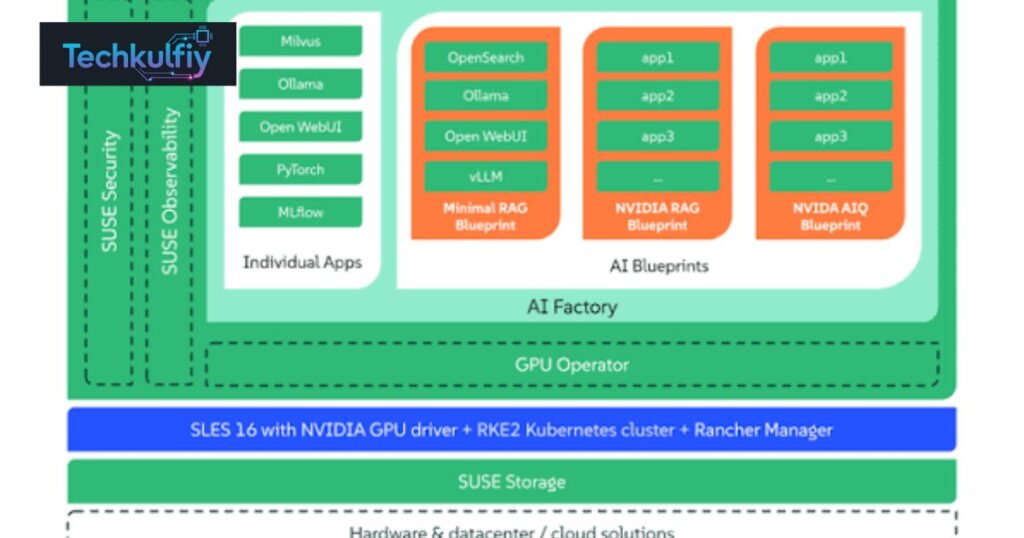
SUSE AI Factory Updates are important for organizations that want to manage artificial intelligence applications across enterprise infrastructure without building every component from scratch. SUSE AI Factory is a platform management solution that combines a Kubernetes operator with a Rancher Prime user interface extension. It helps teams discover AI applications and assemble them into version-controlled blueprints for deployment.
The platform focuses on simplifying the journey from AI experimentation to production. Instead of manually connecting multiple software components, infrastructure teams can use predefined application configurations and manage their deployment through a consistent workflow.
For businesses in the United States, this approach may be useful when AI projects move beyond small experiments and become part of daily operations. Companies need dependable deployment processes, security controls, infrastructure visibility, and ways to maintain applications as their requirements change.
The latest SUSE AI Factory Updates also matter because enterprise AI is not just about selecting a capable model. Organizations must decide where applications run, how they access computing resources, how teams manage upgrades, and how they protect sensitive information.
SUSE AI Factory addresses parts of this operational challenge through Kubernetes management, AI application blueprints, and integration with the broader SUSE ecosystem. Its suitability depends on the organization’s infrastructure, workload requirements, technical expertise, and licensing arrangements.
Latest SUSE AI Factory Updates and Improvements
Recent official documentation describes several improvements to blueprint management, application deployment, repository handling, and workload monitoring. These changes are intended to make enterprise AI environments easier to configure and operate.
One notable area is blueprint customization. Administrators can customize blueprint deployments by overriding Helm values and enabling or disabling individual components before installation. Workloads can also be reconfigured later, helping teams adapt predefined deployments to their requirements.
Another area is configuration visibility. The platform can indicate when a workload’s configuration differs from its blueprint defaults. This gives administrators a clearer view of customizations that may affect future maintenance.
The release notes also describe improvements to workload details and status reporting. Administrators can inspect information such as the workload’s source, deployment strategy, target cluster, namespace, blueprint components, and configuration overrides.
Repository and deployment workflows have also received attention. The release documentation describes support for custom chart repositories and Git-sourced blueprint catalogs, alongside improvements to reporting repository health and workload status.
These SUSE AI Factory Updates are relevant because AI deployments often involve multiple components. When a deployment fails, administrators need enough information to identify the problem instead of relying on guesswork.
Organizations should review the release notes for the exact version they plan to install. Features, limitations, prerequisites, and upgrade instructions can vary between releases.
SUSE AI Factory With NVIDIA
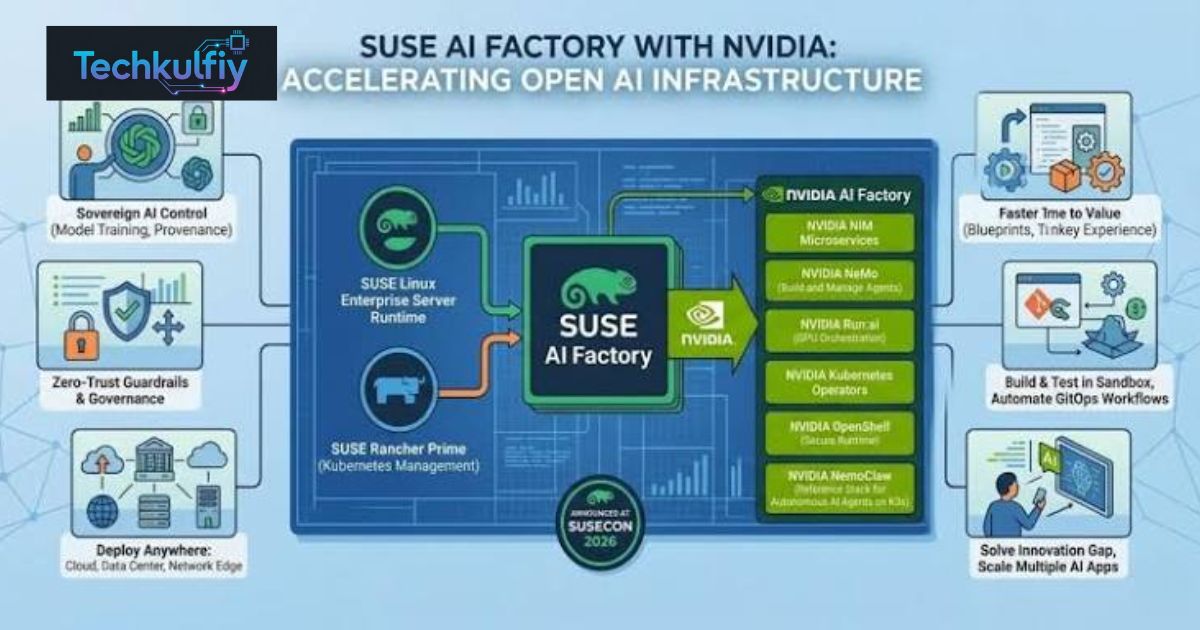
One of the important developments in the SUSE AI ecosystem is SUSE AI Factory with NVIDIA. Announced in 2026, this offering combines SUSE’s enterprise infrastructure approach with NVIDIA’s AI software ecosystem to help organizations build and operate AI workloads.
The goal is to provide a more integrated environment for deploying enterprise AI applications. Instead of assembling every layer independently, organizations can work with a coordinated software stack designed for enterprise infrastructure.
NVIDIA technologies are particularly relevant to workloads that require GPU acceleration, such as large language model inference, image processing, and other computationally intensive AI tasks. However, the required hardware and supported software depend on the specific application.
The SUSE AI Factory Updates associated with NVIDIA integration are relevant to businesses exploring AI infrastructure for private environments, data centers, and distributed deployments. Organizations can evaluate whether the combined ecosystem fits their performance, governance, and operational requirements.
It is important to distinguish general platform support from guaranteed application compatibility. Not every NVIDIA chart or application necessarily has the same support status. Organizations should check the relevant catalog and support documentation before choosing a deployment.
Businesses should also assess GPU availability, driver compatibility, resource allocation, model requirements, and software licensing. These details can affect the total cost and complexity of running AI applications in production.
How AI Blueprints Simplify Deployment
AI blueprints are a central concept in SUSE AI Factory. A blueprint groups application components and their configuration into a reusable deployment definition.
Consider a company that wants to deploy an internal AI assistant. The application might require a web interface, an inference service, a language model, and additional services for retrieving information from company documents.
Without a reusable blueprint, engineers may need to configure each component separately, maintain multiple configuration files, and document the correct installation order. A blueprint-based approach can organize the relevant components into a repeatable deployment process.
This is especially useful when an organization needs to create similar environments for development, testing, and production. Version-controlled configurations make it easier to understand what changed between deployments.
The SUSE AI Factory Updates concerning blueprint customization help administrators adapt deployments without abandoning the reusable blueprint approach. Teams can adjust supported settings, choose relevant components, and manage differences between the intended configuration and the running workload.
However, a blueprint does not remove the need for engineering review. Teams must still understand the application’s dependencies, security requirements, resource consumption, and compatibility with the target cluster.
Well-managed deployment automation can reduce repetitive work, but poorly maintained templates can also spread mistakes across multiple environments. Organizations should review blueprint changes, test upgrades, and maintain clear ownership of production configurations.
Managing AI Applications Through Rancher
Rancher provides a management interface for Kubernetes environments. SUSE AI Factory extends this experience to help administrators discover and manage AI applications and blueprints.
A centralized management interface can be useful when an organization operates several applications or clusters. Instead of requiring every team to follow a completely separate deployment process, administrators can work with consistent workflows and status information.
For example, an IT department may operate an internal chatbot, an inference endpoint, and a retrieval-augmented generation application. Each application may have different dependencies, but administrators still need to understand where it runs, whether it is healthy, and which configuration it uses.
The SUSE AI Factory Updates related to workload visibility are designed to make this type of management more transparent. Workload details can help teams investigate deployment status and review relevant configuration information.
A centralized interface does not mean every application will automatically work in every cluster. The underlying Kubernetes environment must meet the application’s requirements, and administrators remain responsible for infrastructure readiness, access permissions, and operational policies.
Organizations should also decide which teams can install applications, modify blueprints, or manage production workloads. Clearly defined permissions reduce the risk of accidental changes and improve accountability.
Supporting Retrieval-Augmented Generation Applications
Retrieval-augmented generation (RAG) combines a language model with a process for retrieving relevant information from an external knowledge source. This approach can help an AI application answer questions using selected documents rather than relying entirely on information learned during model training.
For example, a company could create an internal assistant that searches approved policy documents before answering employee questions. A RAG workflow might include document ingestion, text processing, an embedding model, a vector database, retrieval logic, and a language model.
SUSE AI Factory documentation includes preconfigured blueprint examples for a simple chatbot with RAG, including a variant using vLLM and Milvus. Exact availability and requirements should be checked against the current catalog and release documentation.
The SUSE AI Factory Updates related to application blueprints can help teams explore these types of workloads through a more structured deployment process.
However, RAG does not guarantee that every response will be correct. The application may retrieve outdated documents, overlook relevant information, or generate a misleading answer despite having access to useful context.
Businesses should test retrieval quality, establish document permissions, and monitor the sources used by the application. Sensitive company information should only be available to users who have appropriate access rights.
A production RAG system also needs a maintenance plan. Documents change, models are updated, and retrieval settings may need adjustment. A reusable deployment definition can help manage infrastructure, but content quality and application behavior require ongoing attention.
Enterprise AI Security and Governance
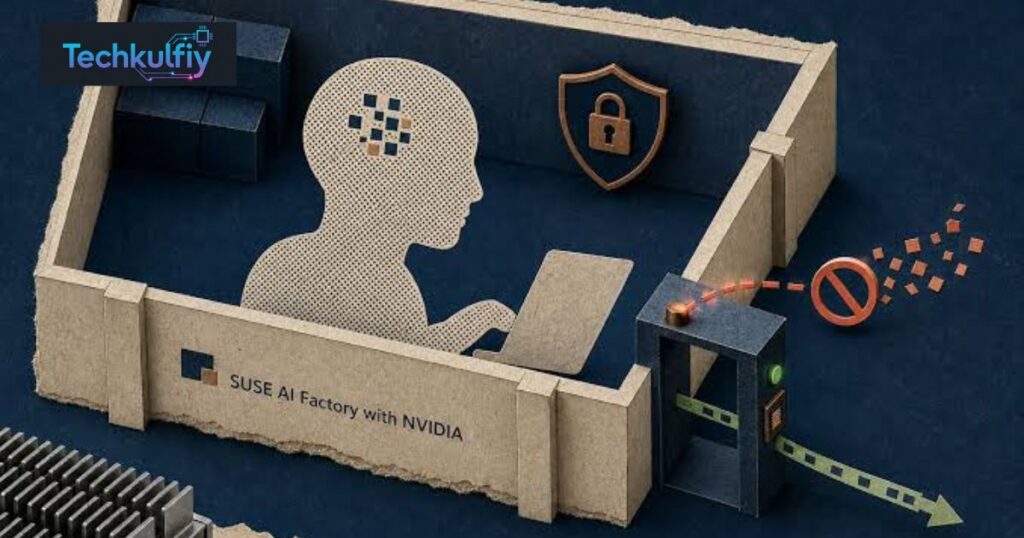
Security becomes increasingly important when AI applications process business information. An internal assistant may have access to company policies, customer records, technical documents, or other sensitive data.
Organizations must therefore consider AI security, identity and access management, network restrictions, software supply chains, and the permissions granted to individual services.
The SUSE AI Factory documentation includes guidance on maintaining data integrity in AI applications. This reflects a broader operational concern: attackers may exploit weaknesses in the application stack to access sensitive resources or alter system behavior.
The SUSE AI Factory Updates should be evaluated alongside the security capabilities of the complete deployment. Organizations need to verify which protections are supplied by SUSE AI Factory, which depend on other SUSE products, and which must be implemented separately.
A secure deployment may require authenticated access to application catalogs, protected credentials, restricted network paths, image scanning, and careful management of service permissions. The exact controls depend on the environment and the components being deployed.
Governance also involves documenting who can approve AI applications, which models may be used, what data they can access, and how changes are reviewed.
Security is not a one-time installation step. Teams should monitor software updates, investigate unexpected workload behavior, review access logs, and regularly test recovery procedures.
Air-Gapped and Restricted Environments
Some organizations cannot connect their AI infrastructure directly to public internet services. They may operate in regulated facilities, isolated networks, or environments with strict restrictions on external data transfers.
An air-gapped environment is designed to limit or eliminate direct network connectivity to outside systems. Such deployments can help meet particular security requirements, but they introduce additional operational challenges.
SUSE AI Factory documentation describes deployment support for restricted environments involving private chart repositories, private Git repositories, repository credentials, and certificate trust configuration.
These SUSE AI Factory Updates can be relevant to organizations that need to control where software packages come from and how application configurations are maintained.
Air-gapped support does not automatically prepare every part of the infrastructure. Administrators may still need to configure operating system repositories, DNS, host proxies, container registry mirrors, and other cluster dependencies. Container images referenced by blueprint values must also be available through an appropriate registry setup.
Organizations should plan how to import approved software, verify its integrity, manage updates, and handle security advisories when direct internet access is unavailable.
The additional work can be worthwhile for environments with strict isolation requirements, but it should be included in the deployment budget and operating procedures from the beginning.
Monitoring AI Workloads and Troubleshooting Problems
AI applications can fail for several reasons, including insufficient computing resources, missing credentials, unavailable model files, incompatible software versions, and incorrectly configured dependencies.
Workload monitoring helps administrators identify these problems and determine whether an application is operating as expected.
SUSE AI Factory release documentation describes improvements to workload status reporting. For example, workloads using Helm can derive status from pod and controller readiness instead of being treated as running merely because a Helm release exists.
This distinction matters. An application can have a successfully created deployment record while the underlying workload is still starting, unable to schedule, or repeatedly restarting.
The SUSE AI Factory Updates involving workload details can help administrators inspect deployment information and status messages. These details can narrow the investigation, although they do not eliminate the need to understand Kubernetes and application behavior.
For more complete observability, organizations should consider metrics, logs, traces, and infrastructure monitoring. SUSE documentation also describes monitoring AI workloads with OpenTelemetry and SUSE Observability.
Monitoring should cover both technical health and application-level performance. A chatbot may be running successfully while producing slow responses, returning poor retrieval results, or using more GPU resources than expected.
Teams should define practical alerts, assign responsibility for investigating failures, and test what happens when a model server or supporting service becomes unavailable.
Hardware and Infrastructure Requirements
Enterprise AI deployments can require substantial computing resources. The exact requirements depend on the selected applications, model sizes, expected user demand, and whether workloads require GPU acceleration.
SUSE AI Factory documentation outlines hardware and software prerequisites for the management environment. Its requirements include memory, CPU, storage, Kubernetes infrastructure, and additional considerations for specific applications.
For example, the documented baseline for basic functionality includes at least 32 GB of RAM per node as a minimum recommendation for a control-plane node, along with a multicore processor and sufficient disk space. High-availability and application-specific deployments may require additional resources.
These figures should not be interpreted as universal requirements for every AI workload. A lightweight application and a large language model serving environment can have very different infrastructure needs.
The SUSE AI Factory Updates should therefore be reviewed alongside the requirements for each application and the supported infrastructure configuration.
Before deployment, organizations should estimate model memory requirements, expected concurrency, storage for model files, network bandwidth, and GPU availability. They should also account for monitoring services, security tools, and other platform components.
A realistic capacity plan helps prevent expensive surprises. It should include expected growth, maintenance windows, redundancy, and the cost of running idle or underused infrastructure.
SUSE AI Factory for Small and Large Businesses
The value of SUSE AI Factory depends on the organization’s size, technical maturity, and AI ambitions.
A large enterprise may operate several Kubernetes clusters and require consistent deployment procedures across departments. For such an organization, reusable blueprints, centralized management, and documented configuration changes can provide meaningful operational benefits.
A smaller company may have fewer applications and a simpler infrastructure. It should evaluate whether the management capabilities justify the additional platform requirements, licensing, and specialist expertise.
The SUSE AI Factory Updates may be most useful to organizations that already use or plan to use the relevant SUSE and Kubernetes infrastructure. Teams that lack Kubernetes experience may need additional training or implementation support.
A company should not adopt an enterprise AI platform simply because AI is popular. It should begin with a specific business problem, estimate the cost of solving it, and compare the platform’s capabilities with simpler alternatives.
Potential use cases include internal knowledge assistants, controlled inference services, document processing, and other workloads that can be supported by the chosen software stack. Each use case should be evaluated separately for data sensitivity, expected accuracy, operating cost, and measurable business value.
Benefits and Limitations of SUSE AI Factory
SUSE AI Factory can offer several potential advantages for organizations that need a structured approach to AI application operations.
Reusable AI deployment blueprints can reduce repeated configuration work. Version-controlled definitions can help teams track changes, while centralized management can make workloads easier to inspect. Integration with the broader SUSE ecosystem may also be useful for organizations seeking a coordinated infrastructure approach.
However, these advantages depend on the quality of the implementation and the team’s ability to operate it.
| Area | Potential benefit | Important limitation |
|---|---|---|
| Blueprint management | Reusable, version-controlled configurations | Teams must maintain and test blueprint changes |
| Application deployment | More consistent installation workflows | Applications still have individual prerequisites |
| Workload visibility | Clearer status and configuration information | Troubleshooting still requires technical expertise |
| NVIDIA integration | Access to a coordinated AI software ecosystem | Hardware and support compatibility must be checked |
| Restricted environments | Support for selected private repositories and air-gapped workflows | Infrastructure preparation remains necessary |
| Security | Can fit into a broader enterprise security architecture | Complete security depends on additional controls and processes |
| Scaling | Helps standardize deployments across supported clusters | Capacity, networking, and application limits still apply |
The main takeaway is that a management platform can simplify operational work without eliminating the complexity of AI itself. Organizations still need to select suitable models, secure data, monitor performance, and control costs.
How to Get Started With SUSE AI Factory
Organizations planning to evaluate SUSE AI Factory should begin by reviewing the official installation and requirements documentation.
First, confirm that the intended environment meets the supported software and hardware prerequisites. This includes the appropriate Kubernetes distribution, Rancher Prime version, storage, networking, and any application-specific requirements.
Second, select a small use case. A simple chatbot or inference endpoint may provide a practical starting point, provided the selected blueprint is available and suitable for the environment.
Third, review the blueprint’s components, model requirements, resource consumption, and security implications. Teams should understand which services will be deployed and how those services communicate.
Fourth, install the platform using the documented process and test the deployment in a nonproduction environment. Verify that workloads start correctly, configuration changes behave as expected, and monitoring provides enough information to investigate failures.
Fifth, establish operational procedures for upgrades, backups, access control, and incident response before expanding the deployment.
The SUSE AI Factory Updates are best approached as part of a continuous improvement process. Organizations should track release notes, evaluate relevant changes, test upgrades, and document the impact on production systems.
Licensing and support requirements should also be confirmed before deployment. The availability of particular application catalogs or enterprise features may depend on the applicable subscription and product configuration.
SUSE AI Factory Compared With Building an AI Stack Manually
Organizations can assemble an AI platform manually by selecting infrastructure, model-serving software, databases, application interfaces, security tools, and monitoring systems.
This approach provides flexibility and may be appropriate for teams with strong platform engineering capabilities. However, it also requires engineers to integrate components, maintain configurations, test compatibility, and document operational procedures.
SUSE AI Factory offers a more structured management approach through application discovery, blueprints, and Rancher-based workflows. This may reduce some repetitive work for organizations operating supported Kubernetes environments.
Neither approach is automatically better for every company.
A manual stack may be appropriate when the requirements are highly specialized or when an organization already maintains a mature internal platform. A managed blueprint-based approach may be more attractive when consistency and repeatability are important.
The SUSE AI Factory Updates should be evaluated against measurable criteria, such as deployment time, failure rates, maintenance effort, infrastructure utilization, and the skills required to operate the environment.
The right decision is the one that meets the business requirement with acceptable complexity, risk, and total cost.
Frequently Asked Questions
What is SUSE AI Factory?
SUSE AI Factory is a platform management solution built around a Kubernetes operator and a Rancher Prime user interface extension. It helps organizations discover AI applications and manage reusable, version-controlled deployment blueprints.
What are the latest SUSE AI Factory Updates?
Recent documentation describes improvements to blueprint customization, configuration drift visibility, workload details, repository management, and deployment status reporting. The exact changes depend on the release version.
What is SUSE AI Factory with NVIDIA?
It is an enterprise AI offering that combines SUSE AI infrastructure and NVIDIA’s AI software ecosystem. Organizations should check supported hardware, software versions, and application compatibility before deployment.
Does SUSE AI Factory support RAG applications?
Its documentation includes preconfigured examples for a simple chatbot using retrieval-augmented generation. Availability, dependencies, and resource requirements should be confirmed for the intended version.
Can SUSE AI Factory run in air-gapped environments?
The documentation describes support for selected private repositories, credentials, and certificate configuration in air-gapped deployments. Additional infrastructure preparation is still required.
Does SUSE AI Factory replace Kubernetes?
No. It works with a Kubernetes environment and provides management capabilities for AI applications and blueprints. The underlying cluster must still be installed, configured, and maintained.
Is SUSE AI Factory suitable for small businesses?
It may be suitable for small businesses with relevant infrastructure and AI management needs. Companies should compare its requirements and costs with simpler deployment options before making a decision.
Does SUSE AI Factory guarantee AI security?
No platform can guarantee complete security by itself. Organizations still need access controls, secure configuration, monitoring, vulnerability management, and appropriate data protection procedures.
How can companies evaluate SUSE AI Factory?
They should review the official requirements, choose a relevant use case, test a supported blueprint, measure operational results, and verify licensing, support, and security requirements.
Why are SUSE AI Factory Updates important?
Updates can improve configuration management, deployment visibility, compatibility, and operational reliability. Reviewing release notes helps administrators understand new capabilities, limitations, and upgrade considerations.
Conclusion
SUSE AI Factory is designed to help organizations manage AI applications through a structured, Kubernetes-based approach. Its combination of Rancher integration, reusable blueprints, and workload management can help teams make AI deployments more repeatable and easier to maintain.
The latest SUSE AI Factory Updates highlight the importance of configuration flexibility, clearer workload status, repository management, and support for enterprise deployment workflows. These improvements can be relevant to organizations moving AI projects from experimentation into production.
The platform’s potential value is particularly interesting for businesses that already operate Kubernetes infrastructure or need a consistent approach across multiple environments. Organizations exploring NVIDIA-based workloads, RAG applications, or restricted deployment environments may also find the broader ecosystem worth evaluating.
Still, adopting an AI platform requires more than installing software. Companies need to plan computing capacity, validate application compatibility, protect sensitive information, monitor workloads, and establish upgrade procedures. They should also measure whether the platform reduces operational effort or improves the delivery of useful AI services.
Before adopting SUSE AI Factory, review the official documentation, confirm the required subscriptions, and test the selected workload in a controlled environment. That approach helps organizations make decisions based on practical results rather than marketing claims.
For enterprise teams, the central lesson is simple: successful AI depends not only on models, but also on the infrastructure and operational processes that support them. SUSE AI Factory provides one approach to managing that foundation, and its suitability should be determined by the organization’s specific technical and business needs.
