

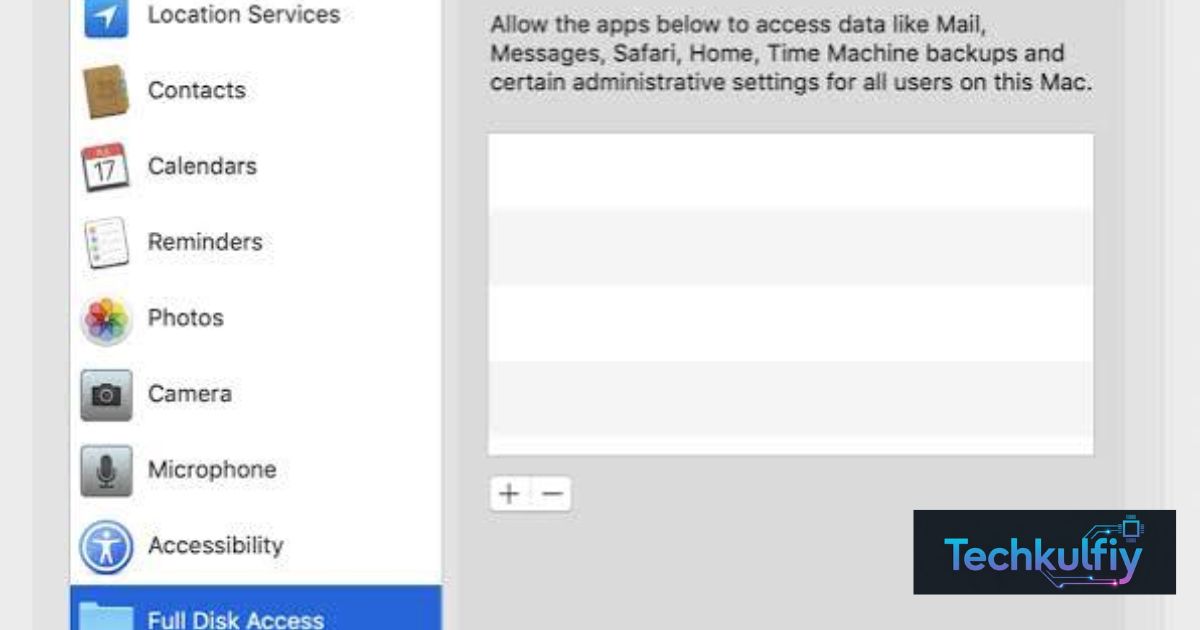
Full Disk Access is a macOS setting for powerful app permissions. It lets apps read files, mail, messages, and browsing history. Apple is now tightening it because of AI agents.
Is your AI assistant reading your private messages on your Mac? It might be. Apple now wants you to approve that access with your eyes wide open.
Apple announced the change on October 2, 2026. Users will need very explicit action to grant this access. Apple hasn’t named a date or macOS version yet.
What Is Full Disk Access on Mac?
Think of Full Disk Access as a master key to your whole house. Normal apps get a key to one room. This permission opens every door. Apple built it for backup tools that need to copy every file. It bypasses the controls that macOS uses to protect folders and other apps’ data, as Notebookcheck explains.
That power helps a backup app. It also helps an AI agent that reads your mail, messages, and Safari history. Apps can’t grant themselves this access. You must switch it on in System Settings. That small step matters a lot.
What Apple Announced on October 2, 2026
Apple posted on its developer news site that it will add “additional controls” for Full Disk Access, according to MacRumors. Going forward users will grant it only with “very explicit user action.” Apple didn’t say when the change arrives.
Apple also warned that some developers use the permission in risky ways. Those uses can expose files, mail, messages, and browsing history without users fully understanding. That language is blunt for Apple. It signals a serious privacy push.
What Apple Hasn’t Said Yet
Apple hasn’t named a macOS version or a release date. It also hasn’t shared the exact mechanism. Until Apple publishes documentation, treat details as unknown. Watch Apple’s developer news for updates.
Why Apple Is Worried About AI Agents
Old apps mostly did one thing. Modern AI agents act on your behalf. They open apps, read documents, and follow plain-language instructions. Apple says the risks of this access will grow substantially as agents become more capable and autonomous.
The timing isn’t random. The announcement arrives amid the rise of always-on agents like Meta’s Muse and OpenAI’s Dots, which have raised privacy concerns. A powerful agent with Full Disk Access could read years of private messages or financial records. That’s why Apple stepped in.
Which Apps Could Be Affected
Any app that uses Full Disk Access could feel the change. That includes backup utilities like Carbon Copy Cloner and SuperDuper. It also includes AI agents on the Mac. The new rules aim at apps that ask for the most power.
Meta says its Muse Mac app can’t read Messages unless you turn on both Full Disk Access and the Messages connector. That claim comes from Meta CTO David Singleton and spokesperson Andy Stone. So you control two switches. Check both.
| App type | Why it may need Full Disk Access |
|---|---|
| Backup tools | Copy every file on the Mac |
| AI agents | Read mail, messages, and files to act for you |
| Security tools | Scan the whole system |
How to Check Which Apps Have Full Disk Access
You can audit your Mac in a minute. Choose the Apple menu and open System Settings. Click Privacy & Security in the sidebar and then Full Disk Access. You’ll see every app with the permission. Switch off any app you don’t recognize or no longer use.
Ask a simple question about each AI tool. Does it truly need to read your mail and messages? If not, turn the access off. Notebookcheck suggests this check, and it takes almost no time.
Case Study: A Freelance Designer Cleans Up Her Mac
Meet Priya, a designer in Portland. She opens Full Disk Access and finds six apps. Two are old trial tools she forgot. She switches those off and keeps her backup app on. Her Mac feels safer and nothing breaks.
Files & Folders Instead of Full Disk Access
Here’s a smarter option. Many AI tools only need certain folders. macOS lets you grant access folder by folder under Files & Folders. That’s like giving a guest one room key instead of the master key. It limits damage if something goes wrong.
Try this first when an AI app asks for access. Give it your Documents folder only. If the app still works you’ve kept your mail and messages private. If it demands more, ask yourself whether you trust it.
What the Change Means for Businesses and IT Teams
Companies face bigger risks. AI agents on employee Macs could leak data through overly broad access. One analysis advises legal and compliance teams to audit which apps already hold Full Disk Access and prepare internal policies. That advice appears at Complete AI Training.
Managed fleets have a tool too. Teams using MDM can apply the Privacy Preferences Policy Control payload to limit access to specific apps, according to iPhoneA2. Start with a short app inventory. Then decide which tools truly deserve broad access.
What We Still Don’t Know
Several questions remain open. Which macOS version will carry the change? Will existing approvals stay in place? How will Apple handle backup apps that truly need the access? Apple hasn’t answered those yet.
One note of caution applies. Apple hasn’t said it will remove Full Disk Access. The permission stays. It just gets harder to grant. Keep your expectations realistic and wait for official guidance.
Frequently Asked Questions (FAQs)
What is Full Disk Access on a Mac?
It’s a macOS permission that lets an app read nearly every file on your Mac, including mail, messages, and Safari history. Apple originally built it for backup tools.
Is Apple removing Full Disk Access?
No. Apple plans to make it harder to grant by requiring very explicit user action. It hasn’t said it will eliminate the permission.
When will the Full Disk Access change arrive?
Apple hasn’t named a macOS version or date. Watch Apple’s developer news for updates.
How do I see which apps have Full Disk Access?
Open System Settings, choose Privacy & Security, and click Full Disk Access. Switch off apps you don’t need.
Is Meta Muse affected?
Meta says Muse can read Messages only if you enable both Full Disk Access and the Messages connector. Apple’s change targets this kind of broad access.
Conclusion
Apple’s Full Disk Access change shows how seriously it takes AI agents. Your Mac holds a lot of private data. That includes mail, messages, files, and browsing history. Apple wants you to approve broad access on purpose rather than by accident. That’s a healthy shift. A permission this powerful deserves real thought before anyone clicks Allow.
Still, big questions remain. Apple hasn’t named a macOS version or a release date. It also hasn’t explained how the new approval step will look. So don’t panic and don’t ignore it either. Full Disk Access isn’t going away. It’s just getting harder to grant. Meanwhile AI tools like Meta’s Muse already need two switches before they can read your messages. That shows how much control you can take back today.
Take five minutes today. Open System Settings, choose Privacy & Security, and click Full Disk Access. Review the list and remove old apps you no longer use. Switch off any tool you don’t recognize. Next time an AI app asks for access, try Files & Folders first. Give it one folder instead of the whole Mac. If it still works, you’ve kept your mail and messages private.
Businesses should act too. IT teams can audit which apps hold Full Disk Access and set clear rules for AI agents. Managed Macs can use MDM tools to limit access app by app. A short app inventory today can prevent a data leak tomorrow. Then watch Apple’s developer news for official rollout details. Until those arrive, smart habits are your best protection.
Maine aap ka diya hua TechCrunch link as it is rakha hai. Agar aap isay hatana chahte hain to bata dein, main link ke bina version de deta hoon.

About the Author
The author at TechKulfiy writes informative articles about technology, software, digital platforms, and IT solutions. The goal is to make complex topics easier to understand by providing clear explanations, practical insights, and helpful information. Each article aims to help readers explore technology topics and make informed decisions.