


Digital businesses rely on documents, invoices, receipts, and financial records to verify transactions. However, altered files and AI-generated documents can make it harder to determine whether submitted information is genuine.
Extend Verify API is associated with the growing use of automated document verification to help businesses identify potentially fraudulent or manipulated files. This type of technology can support teams that need to review large numbers of documents without relying entirely on manual checks.
In this guide, you will learn how document fraud detection works, where an API-based verification system may help, what businesses should consider before adopting one, and why human review remains important when making important decisions.
What Is Extend Verify API?
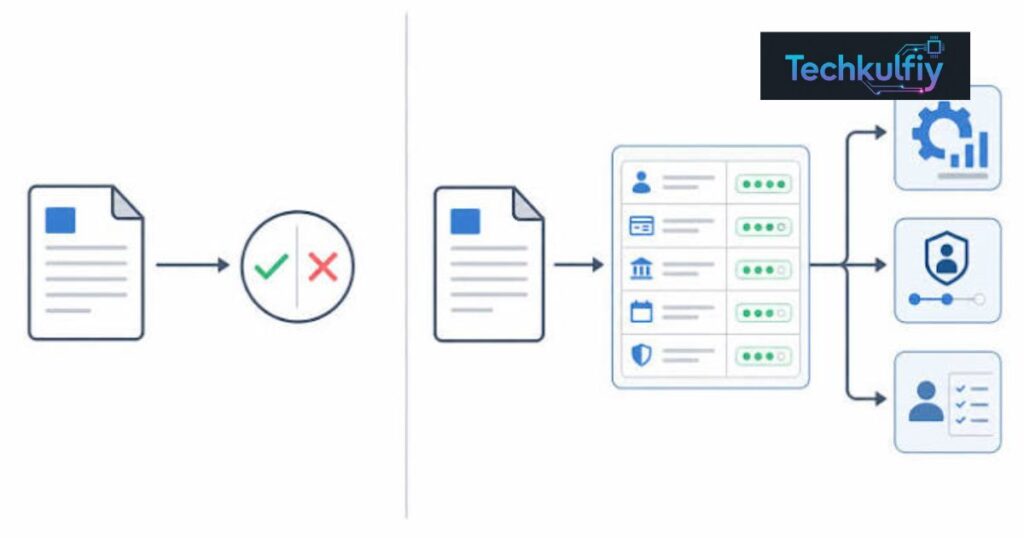
Extend Verify API is described as an API-based fraud detection solution intended to help identify AI-generated, altered, or suspicious documents, including receipts. An API, or application programming interface, allows different software systems to exchange information and request services from one another.
For example, a business may have an online platform where customers submit receipts to request reimbursements. Instead of asking an employee to inspect every file manually, the platform could connect to a document verification service and use its results to identify submissions that deserve further review.
The purpose of this kind of technology is not simply to read text from an uploaded document. It is to help assess whether the file contains signals that may be consistent with manipulation, fabrication, or other forms of fraud.
Extend Verify API should therefore be understood within the wider category of AI fraud detection, document authentication, and automated risk assessment. Its exact detection methods, supported formats, pricing, and technical requirements should be confirmed through current product documentation before implementation.
A verification result should also be treated as evidence for further assessment rather than automatic proof that someone has committed fraud.
Why Businesses Need Automated Document Verification
Many organizations process documents every day. Banks review financial records, employers examine expense claims, online marketplaces receive transaction evidence, and insurance companies assess supporting paperwork.
Manual review can become difficult when submission volumes increase. Employees may need to inspect dates, totals, company names, tax details, transaction references, and other information across hundreds or thousands of files.
Fraudsters may attempt to exploit these processes by editing a genuine receipt, creating a fabricated invoice, or submitting a document that appears authentic but does not correspond to a real transaction.
Extend Verify API represents the type of solution businesses may evaluate when they want to introduce automated checks into an existing verification process.
Automation can help prioritize suspicious submissions, reduce repetitive review work, and provide more consistent screening. However, it does not eliminate the need for clear procedures, accurate records, and trained reviewers.
The strongest approach combines technology with established verification practices. A system can identify warning signs, while employees investigate the context and determine whether the submission should be approved, rejected, or escalated.
How an API-Based Document Fraud Detection System Works
The workflow depends on the provider and the software receiving the documents. In a typical implementation, a business connects its application to a verification service and sends the required file or supported document data for analysis.
The service processes the submission and returns a response that the business’s software can use. That response might contain a status, risk indicators, extracted information, or other findings, depending on the API’s actual capabilities.
Extend Verify API may fit into this kind of workflow when a company wants to screen receipts or other documents during an existing business process. The exact request fields, response format, and supported checks must be verified before developers build an integration.
A practical workflow usually involves several stages.
First, the customer or employee uploads a document through the organization’s existing platform. The application checks basic requirements, such as whether the file type is supported and whether the upload is complete.
Next, the document is submitted to the verification service using the provider’s documented integration method. The service performs the checks available to it and returns a result.
The application then interprets the response according to the organization’s own rules. A low-risk result might allow a submission to continue through the ordinary process. A suspicious result could trigger manual review, a request for additional evidence, or a temporary hold.
Finally, the business records the decision and maintains an appropriate audit trail. This makes it easier to understand why a submission was approved or escalated.
Common Types of Document Fraud
Understanding the kinds of fraud that can occur helps businesses decide what a verification system needs to detect.
AI-generated documents are files created wholly or partly using generative tools. A fabricated receipt may contain convincing formatting and realistic business details without representing an actual purchase.
Image manipulation involves changing a document image. Someone might modify a total, replace a date, change a merchant name, or edit a transaction detail while leaving the rest of the image untouched.
Digital forgery can involve creating a document that imitates the design of a legitimate receipt, invoice, statement, or other record.
Duplicate submissions occur when the same receipt or supporting document is submitted more than once, potentially to obtain repeated reimbursement or payment. Detecting duplicates may require comparison across stored submissions, not just examination of a single file.
Inconsistent document details can also indicate a problem. For example, the total may not match the listed items, or the date may conflict with other information supplied by the customer.
Extend Verify API is relevant to discussions about detecting suspicious documents, but organizations should confirm which fraud categories the actual product supports. No single verification service should be assumed to detect every form of forgery.
Important Features to Evaluate
When assessing Extend Verify API, businesses should focus on capabilities that address their actual risks rather than relying on broad marketing claims.
One important consideration is document authenticity analysis. Businesses need to understand what the service examines and how it identifies potential signs of manipulation. They should ask whether the system analyzes visual features, document structure, extracted text, metadata, or other signals.
Another consideration is AI-generated content detection. Organizations may want to know whether the service can identify suspicious synthetic documents and how its performance varies across different file types and document sources.
Receipt verification is particularly relevant to expense management, reimbursements, returns, and transaction reviews. Useful checks may involve consistency between merchant details, dates, totals, and other submitted information, depending on the product’s supported functions.
API integration is equally important. Developers need clear documentation, predictable response formats, authentication requirements, error handling, and guidance for testing.
Businesses should also evaluate audit logging, data privacy, access controls, and security practices. Documents can contain personal information, financial details, or confidential business records. Their handling must follow the organization’s legal and contractual obligations.
Finally, ask how the provider communicates uncertainty. A useful verification system should help reviewers understand a result rather than encouraging them to treat every warning as conclusive evidence of fraud.
Extend Verify API Compared With Manual Review
Manual review and automated verification serve different purposes. Neither approach is suitable for every situation, and many organizations benefit from using both.
| Factor | Automated verification API | Manual document review |
|---|---|---|
| Processing volume | Can support high-volume workflows, depending on capacity | May require more staff as volume increases |
| Review speed | Can return results automatically when integrated | Depends on reviewer availability and complexity |
| Consistency | Applies configured checks in a repeatable way | Can vary between reviewers |
| Contextual judgment | Limited by the information and capabilities available | Can consider explanations and supporting evidence |
| Integration | Can connect to existing software | May involve separate review tools or procedures |
| Complex cases | May require escalation | Can investigate unusual circumstances |
| Initial effort | Requires technical integration and testing | Requires staffing, training, and procedures |
| Ongoing oversight | Needs monitoring and maintenance | Needs quality checks and staff training |
Extend Verify API may be worth evaluating when an organization wants automated screening within an existing workflow. Manual review remains valuable for cases where context, exceptions, or additional evidence affect the decision.
A business should not choose automation simply because it sounds faster. It should measure whether the system improves processing time, reviewer efficiency, consistency, and fraud detection without creating unacceptable errors.
Practical Use Cases Across Different Industries
Document verification is useful in several business settings, although the requirements differ by industry.
Expense Management
Companies often ask employees to submit receipts for business purchases. A verification workflow can help identify documents that need closer examination before reimbursement.
For example, a finance team may receive receipts with inconsistent totals, suspicious formatting, or repeated transaction details. Automated screening can help direct those submissions to a reviewer.
Extend Verify API may be considered for this type of workflow if its supported checks match the company’s expense management requirements.
Insurance Claims
Insurance companies frequently assess documents submitted as evidence for a claim. These can include invoices, repair estimates, purchase receipts, and other supporting records.
A verification service may help flag suspicious files for additional assessment. However, an insurer should consider the complete claim, not make a final decision solely because an automated system produces a warning.
E-Commerce and Returns
Online retailers may receive receipts, invoices, and other records when processing returns or resolving disputes. Automated document checks can support existing fraud prevention procedures.
A retailer might use the results to identify submissions that require extra evidence or manual review. The process should still account for legitimate customers whose documents have poor image quality or unusual formats.
Financial Services
Financial organizations handle sensitive documents and must follow applicable regulatory and security requirements. Any verification API used in this environment should undergo appropriate technical, privacy, and compliance reviews.
Extend Verify API should only be adopted for a financial workflow after the organization confirms the service’s suitability, security controls, and documented capabilities.
Online Marketplaces
Marketplaces may need to review proof of purchase, seller records, receipts, or other files submitted during disputes. Automated screening can help identify suspicious submissions while preserving a route for human review.
Across all these industries, the system’s value depends on the quality of its results and the way the organization responds to them.
How to Integrate a Verification API Into Existing Software
Successful integration begins with a clearly defined problem. A business should identify which documents need screening, what fraud risks it wants to address, and how the result will affect its workflow.
Before implementing Extend Verify API, developers should review the provider’s official documentation and confirm the available endpoints, authentication process, supported file formats, request limits, and error responses.
The next step is to design the upload and verification process. Files should be transmitted securely, and the application should avoid exposing sensitive documents in unnecessary logs or debugging records.
Developers should also decide what happens when the service is unavailable. A temporary API failure should not automatically be treated as proof of fraud. Depending on the risk level, the application might queue the submission, retry safely, or send it for manual review.
Testing is essential. Use representative documents, including legitimate receipts, altered samples, poor-quality scans, and unusual layouts. Only use test material that the organization has the right to process.
During testing, measure false positives, false negatives, processing time, and the percentage of cases that require manual intervention. These results help determine whether the integration is suitable for the intended workload.
After deployment, monitor performance and review unusual outcomes. Document formats, fraud techniques, and business processes can change, so an integration should not be treated as a one-time project.
Privacy and Security Considerations
Document verification can involve personal data, payment details, employee information, and confidential business records. Organizations must understand how these files are processed and protected.
Before adopting Extend Verify API, review the provider’s current privacy policy, retention rules, security documentation, and contractual terms. Confirm whether documents are stored, how long they are retained, who can access them, and whether they may be used for additional purposes.
Data minimization is a useful principle. Send only the information necessary for the verification task and avoid including unrelated personal details.
Use secure transmission, restricted credentials, appropriate access controls, and a documented process for managing API keys. Credentials should not be exposed in public code repositories or included in client-side applications where unauthorized users could retrieve them.
Organizations should also define retention and deletion procedures. Keeping every uploaded document indefinitely can create unnecessary privacy and security risks.
The appropriate safeguards depend on the type of data, the jurisdiction, the industry, and the organization’s obligations. A technical review should therefore be accompanied by legal or compliance advice where necessary.
Limitations and Risks to Understand
No automated document verification system should be considered perfect. Genuine documents can look suspicious because they were photographed in poor lighting, compressed by a messaging application, or printed and scanned several times.
At the same time, a carefully fabricated document may not contain obvious warning signs. Fraud techniques change, and different document types can present different challenges.
This means Extend Verify API should not be assumed to identify every fake receipt or AI-generated file. Businesses need evidence about the service’s performance on the documents they actually receive.
A false positive occurs when a legitimate submission is incorrectly flagged as suspicious. This can delay reimbursements, frustrate customers, or create unnecessary work for employees.
A false negative occurs when a fraudulent submission is not identified. This can lead to financial losses or other business risks.
Organizations should consider both error types when setting their review policies. A system that flags too many legitimate files may create an expensive backlog, while a system that misses too many suspicious files may offer limited protection.
Human review, supporting evidence, and clear appeal procedures can help manage these risks. Automated findings should inform a decision, not replace careful judgment.
Best Practices for Choosing a Document Verification Solution
Start by listing the fraud risks that matter most to your organization. A company reviewing employee expenses may need different checks from a marketplace handling returns or an insurer assessing claims.
Next, request technical documentation and ask the provider to explain its supported file types, detection methods, limitations, and output format. Avoid relying on vague promises about accuracy.
Test the service with a representative sample of documents. Include different merchants, layouts, image qualities, and legitimate variations. Measure results rather than assuming that performance on a small demonstration will match real-world conditions.
Compare the cost of the service with the time saved, losses prevented, and additional review work created. Pricing should be considered alongside integration effort, maintenance, and the resources needed to investigate flagged cases.
Extend Verify API should be evaluated against these practical criteria, including privacy, reliability, scalability, and ease of integration.
Before making a long-term commitment, establish clear success measures. These might include shorter review times, fewer repeated submissions, a manageable false-positive rate, and better documentation of review decisions.
Frequently Asked Questions
What is Extend Verify API used for?
Extend Verify API is described as an API-based tool for helping businesses identify potentially fraudulent or manipulated documents, including receipts. Its exact supported features should be confirmed through current product documentation.
Can an API detect every AI-generated receipt?
No. Detection systems can make mistakes, and performance depends on the methods used, the quality of the document, and the type of manipulation involved. A suspicious result should be reviewed in context.
Can small businesses use document verification APIs?
Potentially. Small businesses may benefit when they receive enough documents to make manual screening difficult. They should compare pricing, technical requirements, and the actual risks involved before adopting a service.
Does document verification replace human reviewers?
No. Automated screening can prioritize cases and reduce repetitive work, but human reviewers remain important for complex cases, exceptions, and decisions that require contextual judgment.
What should developers check before integrating the API?
Developers should review authentication, endpoints, supported file types, response fields, rate limits, error handling, privacy requirements, and testing procedures. The provider’s official documentation should be the source of truth.
How can businesses reduce false positives?
Use representative testing, monitor flagged submissions, refine review procedures, and allow legitimate users to provide additional evidence. Do not treat a single automated warning as conclusive proof of wrongdoing.
Is Extend Verify API suitable for sensitive financial documents?
That depends on the service’s actual security controls, data handling, contractual terms, and the organization’s compliance obligations. These details should be verified before sensitive information is submitted.
Conclusion
Document fraud is a practical challenge for organizations that process receipts, invoices, expense claims, and other digital records. As document creation and editing tools become more accessible, businesses need verification processes that can identify warning signs without unfairly penalizing legitimate customers or employees.
Extend Verify API is described as a solution for detecting potentially fraudulent or manipulated documents through an API-based workflow. For organizations evaluating this type of technology, the main considerations should be documented capabilities, integration requirements, data protection, accuracy, and the quality of the review process around it.
Automation can help teams process submissions more consistently and prioritize suspicious files. However, no service should be assumed to identify every fraudulent document. Testing with representative data and monitoring real-world outcomes are necessary to understand whether a tool meets a particular business’s needs.
Before implementation, confirm the current product specifications, pricing, supported formats, and privacy practices. Establish procedures for API failures, false positives, and manual investigation. Make sure employees understand how to interpret verification results and how to handle disputed decisions.
Ultimately, the most reliable document fraud prevention strategy combines suitable technology with secure data handling, clear internal policies, and human judgment. Businesses should choose a solution based on measurable performance and real requirements rather than promises alone.
