


Campus Lynx Workday integration connects Workday Student with a scheduling platform. It moves course data between the two systems automatically. Schools use it to stop retyping class details.
Picture a registrar with thousands of sections and a closing deadline. One wrong room code can ruin a whole timetable. Would you trust that job to a spreadsheet?
This guide explains how Campus Lynx Workday integration works for US colleges. You will see features, setup steps, and costs. Read on and plan with confidence.
What Is Campus Lynx Workday Integration?
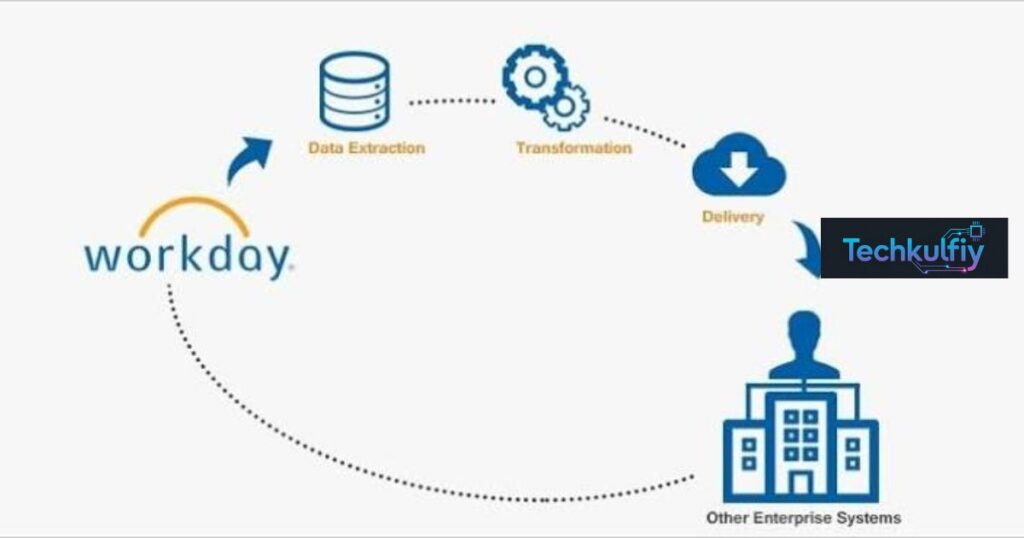
Campus Lynx Workday integration describes the connection between Workday Student, a popular student information system, and a scheduling environment that decides where and when classes meet. Think of Workday Student as the official filing cabinet. It stores courses, sections, instructors, and meeting patterns. The scheduling platform works like a busy dispatcher, since it assigns rooms, avoids clashes, and tracks changes. Without a link between them, your team carries information from the cabinet to the dispatcher by hand, and every trip invites a mistake.
The name “Campus Lynx” needs a quick warning, though. It points to more than one product. JILIT sells a campus ERP under that label, while CollegeNET sells LYNX, an SIS interface built for its Series25 scheduling suite. The facts about Campus Lynx Workday integration come from the CollegeNET side, because CollegeNET states that LYNX supports a Workday Student connection and describes it as automatic and bi-directional. Keep that split in mind as you read, since it shapes nearly every buying decision.
Why Workday Student Schools Care About Campus Lynx Workday Integration
Workday has spread across American higher education in recent years. Many colleges chose it to unify finance, HR, and student records in one cloud environment. That choice solves plenty of problems, yet it doesn’t automatically solve room scheduling. Schedulers still need a tool that understands classes, rooms, exams, and events. This gap explains why Campus Lynx Workday integration attracts so much attention from registrars and facilities teams.
Time pressure makes the interest even stronger. Every term, offices must load thousands of sections before registration opens. Meanwhile, departments keep changing instructors, times, and locations. When people move that data by hand, errors multiply quietly in the background and surface at the worst moment. A solid Campus Lynx Workday integration removes much of that risk by letting the systems talk to each other, so staff spend their energy on decisions instead of data entry.
How Campus Lynx Workday Integration Works Step by Step
The workflow follows a simple cycle. First, the interface reads course records from Workday Student. Next, it pushes those records into the scheduling environment, which for CollegeNET means Series25. After that, it keeps watching for edits and sends them across. CollegeNET says LYNX can upload an entire term of classes in minutes and then continue data synchronization with updates every minute after the first upload. So Campus Lynx Workday integration keeps both sides close to real time rather than a day behind.
The movement also runs in both directions. Because CollegeNET calls the connection bi-directional, a room assignment made in the scheduling tool can return to the SIS. Schedulers fix conflicts in one place, and the official record catches up without extra typing. Of course, speed doesn’t help when bad data rides along. Clean source records remain essential, so any school that adopts Campus Lynx Workday integration should audit its Workday course data before the first big upload.
Key Features of Campus Lynx Workday Integration
The headline feature is the mass course upload. Instead of keying sections one by one, a scheduler lets the interface import a full academic term at once. Another strong feature is real-time data synchronization, which keeps Workday Student and the scheduling platform matched without anyone pressing a button. These two tools explain why Campus Lynx Workday integration saves so many hours in a registrar’s office.
CollegeNET also highlights support for cross-listed courses, multi-campus classes, and video-conference sections. Those cases cause headaches in manual workflows, since one class may appear under several department codes or meet in two places at once. Add interface process status monitoring, and your team can see whether a transfer succeeded or failed. That visibility beats guessing, and it makes Campus Lynx Workday integration feel dependable instead of mysterious.
| Feature | What it does for your team |
|---|---|
| Mass course upload | Loads a full term of classes in minutes |
| Real-time sync | Refreshes data every minute after the first upload |
| Bi-directional updates | Sends changes both ways between Workday and Series25 |
| Cross-listed course support | Manages sections shared across departments |
| Process status monitoring | Shows whether a transfer worked |
Series25 Tools Connected Through Campus Lynx Workday Integration
LYNX doesn’t work alone. It feeds the wider Series25 family, and each tool plays a separate role. Schedule25 focuses on academic scheduling optimization, so it can automate course and exam placement while respecting institutional rules and room requirements. 25Live supports course and event scheduling, space management, workflows, and resource management, and CollegeNET describes real-time availability that helps cut double bookings.
Two more pieces round out the picture. X25 provides scheduling analytics, which help teams find underused rooms, study demand, and model changes before they commit. Connect25 reaches toward student organizations, events, budgets, and communications. Together, these tools turn Campus Lynx Workday integration from a simple data pipe into a connected workflow, where course data enters once and then supports planning, booking, analysis, and student engagement across campus.
| Scheduling need | Series25 component |
|---|---|
| Workday Student data connection | LYNX |
| Academic course scheduling | Schedule25 |
| Course, event, and room booking | 25Live |
| Utilization and planning | X25 |
| Student organizations and events | Connect25 |
Final Exams and Date Changes in Campus Lynx Workday Integration
Final exam scheduling deserves its own spotlight. Exams arrive at the worst moment, when everybody feels tired and stretched. CollegeNET lists exam scheduling among the capabilities of LYNX and Series25, so exam data can follow the same path as regular classes. Because Workday stays in sync with the scheduler, last-minute changes reach students faster, and schedulers receive fewer frantic emails during the final week. That reliability makes Campus Lynx Workday integration valuable long after the first week of term.
Real life also interrupts the calendar. Snowstorms cancel classes. Holidays shift meeting patterns. Departments schedule make-up sessions after closures. CollegeNET says LYNX offers tools for date exception management, including weather cancellations, holiday changes, and make-up dates. Handling those cases inside the workflow keeps the schedule accurate when life gets messy. In short, Campus Lynx Workday integration treats change as a normal event rather than an emergency.
Campus Lynx Workday Integration vs JILIT Campus Lynx ERP
Here many buyers get confused. JILIT’s Campus Lynx is positioned as a scalable education ERP that covers admissions, student records, fees, examinations, library, HR, finance, and alumni management. Its SIS lives inside the product, so a school that adopts it would normally use that built-in module rather than connect Workday Student. That path suits an institution that wants one platform for nearly everything.
CollegeNET’s approach differs sharply. It doesn’t replace Workday and it doesn’t run your finance office. Instead, Campus Lynx Workday integration through LYNX connects the Workday you already own to Series25. A university that has invested heavily in Workday can keep that investment and still gain strong scheduling. Treating the two products as direct rivals misleads people, because they solve different problems.
| Question | JILIT Campus Lynx ERP | CollegeNET LYNX |
|---|---|---|
| Main role | Campus ERP | SIS-to-scheduling interface |
| Includes its own SIS | Yes, as a module | No, connects to yours |
| Works with Workday Student | Confirm with vendor | Yes, per CollegeNET |
| Course schedule uploads | Depends on setup | Core feature |
| Best for | Full administrative suite | Workday schools needing scheduling |
Benefits and a Real-World Example of Campus Lynx Workday Integration
The first benefit is time. Manual entry eats hours that staff could spend helping students, and Campus Lynx Workday integration shrinks those transfers to minutes. The second benefit is accuracy, since fewer hand-typed records mean fewer mistakes and fewer angry phone calls in August. Visibility improves too, because leaders can see room utilization, demand patterns, and bottlenecks without chasing five departments. However, software won’t fix weak processes alone. Data governance, training, and clear ownership still decide success.
Providence College offers a helpful snapshot, even though it used a different SIS. CollegeNET reports that the school once spent hours importing spring courses from its Banner SIS into its scheduling system. After adopting LYNX, the same import took minutes, and Associate Registrar Gina DeBernardo described the change as “night and day.” The college didn’t just buy faster software. It cleaned its workflow and then let automation handle the boring parts. Workday schools can hope for a similar lift, though results from Campus Lynx Workday integration will depend on data quality and setup.
Implementation Steps and Compatibility Checks for Campus Lynx Workday Integration
Start with an audit. List your Workday Student version, your scheduling tools, your data fields, and your login method. Then map which fields move where. Compatibility claims change as software evolves, so ask CollegeNET which exact Workday releases and configurations it supports, and who handles setup on each side. Schools with several systems should dig deeper, because CollegeNET describes setups where one SIS feeds multiple 25Live instances and the reverse.
Next, run a pilot with one department before loading the whole campus. Test the hard cases first, such as cross-listed sections, multi-campus classes, and exam periods. Then train your staff and write a plan for handling errors. Skipping the pilot is the classic mistake, and it hurts every time. Another common error involves ignoring dirty data, which spreads quickly once Campus Lynx Workday integration automates the flow. Assign one owner for the integration so small issues never pile up unnoticed.
Pricing and Total Cost of Campus Lynx Workday Integration
Pricing rarely appears on public pages. Third-party sources list JILIT Campus Lynx pricing as available on request, and enterprise scheduling software usually follows the same pattern, so ask CollegeNET for a current quote. Costs depend on student count, users, modules, campuses, integrations, data migration, customization, training, support, and hosting. Treat any random figure on an old software page with suspicion when you budget for Campus Lynx Workday integration.
Total cost goes beyond licenses. Implementation, configuration, training, and ongoing maintenance all join the bill. A multi-campus university with many connected systems will pay a very different amount from a small college with simple needs. Ask for a quote that covers the whole project rather than licenses alone, since a cheap sticker price can hide large extras.
| Cost factor | Why it changes the price |
|---|---|
| Number of students | Sets the scale of the system |
| Modules | More tools mean wider implementation |
| Integrations | Each connected system needs technical work |
| Data migration | Old records need cleaning and validation |
| Training and support | Staff time and ongoing help add up |
Frequently Asked Questions About Campus Lynx Workday Integration
Does Campus Lynx Workday integration really support Workday Student?
Yes. CollegeNET states that LYNX supports a Workday Student connection and describes it as automatic and bi-directional. Confirm your exact version and setup with the vendor before you commit.
Can Campus Lynx Workday integration upload a full course schedule?
Yes. CollegeNET says LYNX can upload an entire term of classes in minutes and supports mass course uploads. Updates keep flowing after the first import.
How often does Campus Lynx Workday integration update data?
CollegeNET says updates occur every minute after the initial upload. That gives schedulers near real-time information.
Does Campus Lynx Workday integration support cross-listed courses?
Yes. CollegeNET says LYNX manages cross-listed sections and supports multi-campus and video-conference classes. Test these cases in a pilot.
Does Campus Lynx Workday integration help with final exam scheduling?
Yes. CollegeNET lists final exam scheduling among the capabilities of LYNX and its Series25 environment.
How does Campus Lynx Workday integration handle weather closures?
LYNX includes tools for date exceptions. CollegeNET describes workflows for cancellations, holiday changes, and make-up class dates.
Is JILIT Campus Lynx the same as CollegeNET LYNX?
No. JILIT Campus Lynx is a broad education ERP, while CollegeNET LYNX is an SIS interface for the Series25 scheduling suite. Always confirm the vendor first.
Does Campus Lynx Workday integration have public pricing?
Third-party sources list JILIT Campus Lynx pricing as available on request. Ask CollegeNET for a quote based on your student count, modules, and support needs.
Which other systems work besides Workday Student?
CollegeNET lists Ellucian Banner, Colleague, Oracle Campus Solutions, PeopleSoft, Anthology Student, Jenzabar, and homegrown systems, depending on the environment.
What should I check before choosing Campus Lynx Workday integration?
Review your Workday version, required data fields, security controls, user roles, training needs, support terms, and total cost of ownership. Then run a pilot with one department.
Conclusion: Is Campus Lynx Workday Integration Right for Your Campus?
Campus Lynx Workday integration solves a practical problem. It connects Workday Student with Series25 scheduling tools, keeps updates flowing in both directions, and reduces the typing that causes costly errors. CollegeNET says LYNX can load a full term in minutes and refresh data every minute afterward, which turns a painful chore into a background task. Schedulers also gain tools for final exams, cross-listed classes, and date changes.
Still, success depends on preparation. Confirm which Campus Lynx product you mean, check your Workday version and data quality, and compare the total cost of ownership. Then run a small pilot before going campus-wide. Do that, and Campus Lynx Workday integration can turn your busiest weeks into calmer ones.

About the Author
The author at TechKulfiy writes informative articles about technology, software, digital platforms, and IT solutions. The goal is to make complex topics easier to understand by providing clear explanations, practical insights, and helpful information. Each article aims to help readers explore technology topics and make informed decisions.