

Microsoft Reward is a free program from Microsoft that lets users earn points.
You can earn points through searches, quizzes, shopping, and other activities.
These points can later be used for gift cards and other available rewards.
Want to earn rewards while doing things you already do online?
Microsoft Reward makes everyday searches and activities more rewarding.
A few simple actions can help you build points over time.
Microsoft Reward connects with services like Bing, Xbox, and Microsoft Edge.
Users can check their points through the Microsoft Rewards dashboard.
Available activities and rewards may vary by region and account.
What Is Microsoft Rewards and How Does It Work?
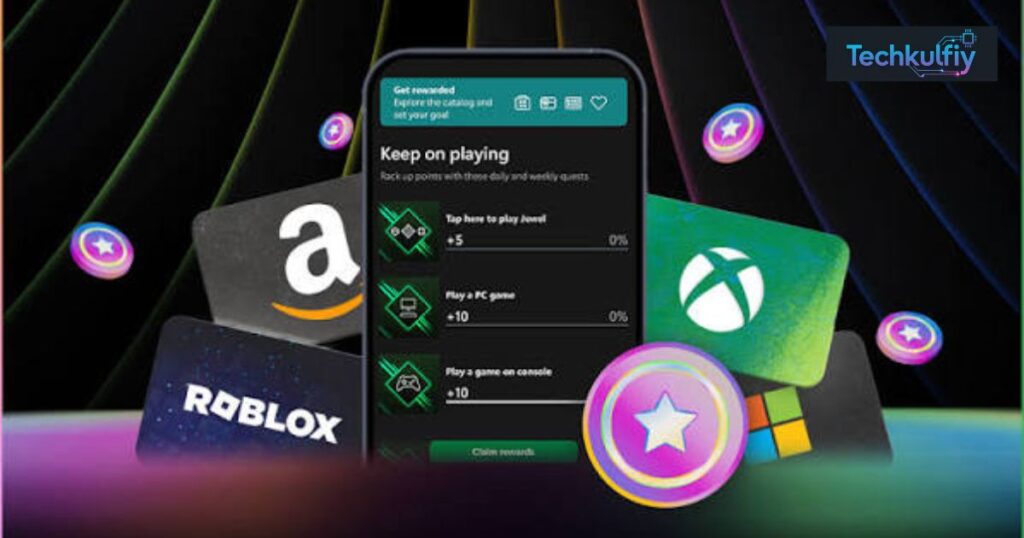
Microsoft Rewards is a free loyalty program connected to your Microsoft account. The Microsoft Rewards program gives you opportunities to collect points when you complete qualifying activities. After you build a balance, you can visit your Microsoft Rewards dashboard and choose from the Microsoft Rewards redemption options available to your account. Microsoft says the program is free to join and requires a valid Microsoft account in a participating region. ([Microsoft][2])
The process can be compared to a digital loyalty card. A coffee shop might give you a stamp whenever you buy a drink. After enough stamps, you get a reward. Microsoft Rewards points earning works in a similar way, except your qualifying actions can include searches, shopping, gaming, and selected promotions.
Your Microsoft Rewards account connects your activity with your points balance. The Microsoft Rewards account dashboard lets you see available activities, your current balance, rewards, and other account information. Microsoft also provides different Microsoft Rewards levels, with Level 1 and Level 2 offering different earning opportunities. ([Microsoft Support][3])
| Microsoft Rewards area | What you can do |
|---|---|
| Microsoft Rewards Bing | Earn points from eligible Bing searches |
| Microsoft Rewards Microsoft Edge | Use Bing through Microsoft Edge for eligible earning opportunities |
| Microsoft Rewards Xbox | Earn through selected gaming activities and quests |
| Microsoft Rewards Microsoft Store | Earn points from qualifying purchases |
| Microsoft Rewards daily sets | Complete selected daily activities |
| Microsoft Rewards quizzes | Complete eligible quizzes and trivia |
| Microsoft Rewards offers | Participate in available promotions |
| Microsoft Rewards charity donations | Give eligible points to supported nonprofits |
The exact activities shown on your dashboard can differ. Microsoft explains that offers and redemption catalogs vary by region, and some earning methods aren’t available everywhere. ([Microsoft Support][4])
“More rewards. More fun.” — Microsoft Rewards
The important point is that Microsoft Rewards isn’t a traditional bank account. Your points can’t simply be treated like dollars sitting in a wallet. Instead, you use the points for specific rewards shown through Microsoft’s redemption system.
How to Get Started With Microsoft Rewards
Getting started with Microsoft Rewards is straightforward. First, sign in with your Microsoft account. If you already have a Microsoft account, you generally don’t need to create a separate email account just for Rewards. Microsoft says you should activate your Rewards account through the Microsoft Rewards dashboard before redeeming points. ([Microsoft][5])
After signing in, open your Rewards dashboard and look at the activities currently available to you. This is where you’ll see your balance and the daily Microsoft Rewards activities that may help you earn more points.
The dashboard is worth checking regularly because Microsoft Rewards offers, bonuses, quizzes, and other activities can change. A person who checks the dashboard occasionally may miss opportunities that appear for a limited time.
Your first goal shouldn’t be to collect thousands of points overnight. A better approach is to understand the system, complete legitimate activities, and build your balance gradually.
| Getting started | What to check |
|---|---|
| Microsoft account | Make sure you’re signed in to the correct account |
| Microsoft Rewards account dashboard | Check your points balance |
| Microsoft Rewards daily sets | Look for available daily activities |
| Rewards page | Review current redemption options |
| Account level | Check whether you’re Level 1 or Level 2 |
| Offers | Look for current promotions and bonuses |
Microsoft’s current U.S. Rewards page also shows different earning opportunities for Level 1, Level 2, and Level 2 with Xbox Game Pass Ultimate. These details can change, so your dashboard should be treated as the final source for your account. ([Microsoft][5])
How to Earn Microsoft Rewards Points
There are several Microsoft Rewards earning methods, although the options shown to you depend on your region, account, and current Microsoft offers. One of the most familiar ways to earn Microsoft Rewards points is through Bing searches.
Microsoft currently explains that Bing searches can earn points, with different limits depending on your status and device. Its U.S. information currently shows Level 1 PC search earning at 5 points per search up to 50 points per day, while Level 2 shows 5 points per search up to 150 points per day. Mobile earning has separate limits. ([Microsoft Support][3])
This means Microsoft Rewards points per search shouldn’t be treated as one universal number for every person. Your dashboard and current regional rules matter.
Another method is Microsoft Edge. When you use Bing through eligible Microsoft Edge experiences, you may receive Microsoft Edge rewards. Microsoft also provides earning opportunities through selected Xbox activities, Microsoft Store purchases, daily activities, quizzes, and promotions. ([Microsoft Support][1])
Bing search rewards are particularly easy to understand. You search for information you actually need, and eligible searches can contribute to your Rewards balance. However, Microsoft warns against artificial searching, bots, macros, and rapid activity designed only to generate points. ([Microsoft Support][6])
Microsoft Rewards Xbox can provide another earning route for eligible users. Selected games and quests may provide Xbox rewards points, while Game Pass users may see additional gaming-related opportunities.
The Microsoft Rewards Microsoft Store system can also award points for qualifying purchases. Microsoft’s current U.S. page says qualifying purchases can earn points, although subscriptions and gift-card purchases may not qualify for that particular shopping offer. ([Microsoft][5])
| Earning method | Example |
|---|---|
| earn points with Bing | Complete eligible Bing searches |
| Microsoft Edge rewards | Search through eligible Edge experiences |
| Xbox rewards points | Complete selected Xbox activities |
| Microsoft Store rewards | Make qualifying purchases |
| Microsoft Rewards daily quiz | Complete an available quiz |
| Microsoft Rewards streak bonus | Maintain eligible activity streaks |
| Microsoft Rewards bonus points | Complete available bonus offers |
| Microsoft Rewards shopping points | Earn through qualifying shopping activity |
Because these methods can change, don’t assume an old screenshot or guide represents your current account.
How to Earn More Microsoft Rewards Points Daily
If your goal is to increase your Microsoft Rewards daily points, consistency matters more than trying to perform hundreds of actions in a few minutes.
Start by checking your Microsoft Rewards dashboard once a day. Look for your available Microsoft Rewards daily sets, quizzes, streak opportunities, and other offers. Then use Bing naturally during your normal day.
For example, imagine Sarah searches Bing several times while researching a college project, completes her available daily quiz, checks a Rewards activity, and completes a qualifying Xbox quest later. She isn’t changing her entire routine. She’s simply using Microsoft products she already needs while taking advantage of legitimate Rewards opportunities.
That is a much more sustainable approach than trying to force a huge number of searches into a few minutes.
Case Study: A Simple Daily Microsoft Rewards Routine
Suppose a U.S. user checks the dashboard in the morning. They complete their available daily activities, use Bing for genuine searches throughout the day, and complete eligible Xbox activities in the evening. Their total points depend on their account level, current offers, and applicable limits.
The lesson isn’t a specific daily total. The lesson is consistency. Microsoft Rewards bonuses, promotions, and activities can change, so a fixed “earn exactly X points every day” formula isn’t reliable.
Microsoft specifically advises users to spread searches throughout the day rather than performing rapid back-to-back searches. It also warns against using tricks, bots, macros, or automated searches to collect points. ([Microsoft Support][6])
| Better approach | Why it helps |
|---|---|
| Check the dashboard daily | You can see current activities |
| Use Bing naturally | Your searches have a real purpose |
| Complete available quizzes | You can collect eligible activity points |
| Check promotions | Some offers provide additional opportunities |
| Use eligible Xbox activities | Gaming can provide another earning method |
| Avoid automation | It can trigger earning restrictions |
Think of Microsoft Rewards points earning like saving spare change. A few points may seem small, but regular activity can build a useful balance over time.
Microsoft Rewards Levels and Earning Limits
Microsoft Rewards levels determine some of the benefits and earning opportunities available to you. Microsoft currently describes Level 1 and Level 2, with an additional Level 2 + Xbox Game Pass Ultimate category on its U.S. Rewards page. ([Microsoft][5])
Microsoft Rewards Level 1 is the starting status. You can participate in the program and access eligible earning opportunities.
Microsoft Rewards Level 2 provides additional benefits. Microsoft currently says Level 2 members can earn more points on Bing, earn points at the Microsoft Store, save on some reward redemptions, and access exclusive offers. ([Microsoft Support][3])
The Microsoft Rewards Level 2 requirements can involve earning at least 500 points during a month under Microsoft’s current U.S. program information. However, program details can change, so check your dashboard for the current requirements applicable to your account. ([Microsoft][5])
| Status | Current U.S. example | Main idea |
|---|---|---|
| Microsoft Rewards Level 1 | Starting level | Access the basic program |
| Microsoft Rewards Level 2 | 500 points per month shown by Microsoft | More earning opportunities and perks |
| Level 2 + Game Pass Ultimate | 500 points per month plus subscription | Additional Xbox-related opportunities |
Your Microsoft Rewards earning limits are important. Microsoft can limit how many points you earn from certain activities over a period. Search limits may also apply.
For example, Microsoft’s current U.S. page lists 50 daily PC Bing search points for Level 1 and 150 daily PC Bing search points for Level 2. These figures are examples of current U.S. limits, not a promise that every account in every region has identical limits. ([Microsoft][5])
Microsoft also says unusual search patterns can temporarily lead to earning limitations. Spreading searches naturally is recommended. ([Microsoft Support][6])
What Can You Redeem Microsoft Rewards Points For?
Once you have enough points, you can redeem Microsoft Rewards points for eligible options shown in your market. Available choices can include gift cards, sweepstakes entries, Microsoft-related rewards, and charitable donations.
Microsoft Rewards gift cards are one of the most recognizable redemption options. Depending on your region and account, you may see gift cards for Microsoft and other participating brands.
Microsoft’s current U.S. Rewards page shows examples beginning at different point amounts, including Microsoft Store or Xbox gift cards and gift cards from participating retailers. The exact catalog and point requirements can change. ([Microsoft][5])
You may also find Microsoft Rewards charity donations. Microsoft’s program allows users to direct eligible points toward supported nonprofit organizations. Microsoft says its current U.S. program provides access to a large selection of nonprofits. ([Microsoft][5])
| Redemption option | What it means |
|---|---|
| Microsoft Rewards gift card redemption | Exchange eligible points for available gift cards |
| Microsoft/Xbox rewards | Use points for eligible Microsoft-related options |
| Sweepstakes | Enter available promotional drawings |
| Microsoft Rewards charity | Donate eligible points |
| Microsoft Rewards nonprofit donations | Support participating nonprofit organizations |
The best redemption depends on what you actually want. A person who regularly buys Xbox content may value a Microsoft or Xbox reward differently from someone who prefers a retailer gift card.
This is also why Microsoft Rewards redemption options should be checked before you spend months saving toward one specific reward.
How to Redeem Microsoft Rewards Points
To redeem Microsoft Rewards points, start by opening your Rewards dashboard and checking your current balance. Then open the redemption section and review the rewards currently available in your region.
Choose a reward that you have enough points to claim. Read the redemption details carefully, then follow Microsoft’s verification instructions.
Microsoft says some redemptions may require additional verification, including a working non-VoIP phone number. Microsoft also offers QR-code verification in certain situations. ([Microsoft Support][7])
The basic process looks like this:
| Step | Action |
|---|---|
| 1 | Sign in to your Microsoft account |
| 2 | Open your Microsoft Rewards dashboard |
| 3 | Check your Microsoft Rewards points balance |
| 4 | Open the available Rewards redemption page |
| 5 | Choose an eligible reward |
| 6 | Complete required verification |
| 7 | Confirm the redemption |
If the gift card you want isn’t displayed, don’t assume something is wrong with your account. Microsoft Rewards availability and catalogs vary by market.
Microsoft states that Rewards offers and redemption catalogs vary across regions. The program is currently listed as available in the United States and many other countries, including Pakistan. ([Microsoft Support][4])
You should also avoid using a VPN or proxy to make your account appear to be in another market. Microsoft says Rewards must be redeemed in the same region as the Microsoft account and warns that masking geographic location can lead to account action. ([Microsoft Support][7])
How Much Are Microsoft Rewards Points Worth?
One of the most common questions about Microsoft Rewards points value is whether one point equals one dollar. It doesn’t.
Microsoft explicitly says Microsoft Rewards points have no cash value. However, Microsoft currently gives an example that around 5,000 points can redeem something worth about $5, although the exact value depends on the reward and current redemption offer. ([Microsoft Support][1])
This means the Microsoft Rewards point value is best understood through the reward you’re considering rather than through a universal exchange rate.
For example, if a particular $5 reward requires 5,000 points, the simple comparison is:
| Reward example | Points | Approximate reward value |
|---|---|---|
| Example reward | 5,000 | $5 |
| Example reward | 10,000 | $10 |
| Example reward | 20,000 | $20 |
These examples are for understanding the calculation, not a guarantee that every reward will follow the same ratio.
A Microsoft Rewards points calculator can therefore be useful for comparing two rewards. Divide the reward’s dollar value by the number of points required, then compare the resulting value between options.
For example, if Reward A costs 5,000 points for $5, while Reward B costs 10,500 points for $10, Reward A gives a slightly different points-to-dollar ratio. Checking the actual redemption page is more reliable than relying on an old blog post because Microsoft can change redemption requirements.
The key idea is simple: Microsoft Rewards point value depends on the reward you select.
Microsoft Rewards Problems, Restrictions, and Expiration
Sometimes users earn points but don’t see their balance update. Other users may find that a gift card isn’t available or that searches stop producing points.
One common reason is reaching an applicable earning limit. Microsoft says a search counter may stop crediting additional points after its limit has been reached. Other reasons can include being signed into a different account, browser synchronization issues, Give Mode, unusual search behavior, or attempting to earn from outside the current market. ([Microsoft Support][3])
Microsoft Rewards points expiration is another important issue. Microsoft currently states that unredeemed points expire if you don’t earn or redeem any points for 12 consecutive months. ([Microsoft Support][7])
| Problem | Possible reason |
|---|---|
| Points aren’t increasing | Daily or activity limit may have been reached |
| Search points stop | Search earning limit may apply |
| Reward isn’t available | The reward may not be offered in your market |
| Redemption fails | Verification or account restrictions may apply |
| Streak disappears | Daily activity wasn’t completed or account/time-zone issues occurred |
| Points expire | No earning or redemption activity for 12 consecutive months |
If you’re having trouble, first check that you’re using the correct Microsoft account. Then review your dashboard and current Rewards rules.
Avoid trying to bypass restrictions. Microsoft specifically says rapid searches, automated tools, bots, macros, and artificial search patterns can cause earning limitations or further account action. ([Microsoft Support][6])
Your Microsoft Rewards eligibility requirements also matter. You need a valid Microsoft account and must live in a participating region. Microsoft says the Rewards program is intended for personal, noncommercial use, and its terms place limits on accounts and geographic participation. ([Microsoft][2])
The safest strategy is simple: use your account normally, complete legitimate activities, and follow the current rules shown by Microsoft.
Frequently Asked Questions About Microsoft Rewards
Is Microsoft Rewards free?
Yes. The free Microsoft rewards program does not require a paid membership simply to participate. Microsoft describes Microsoft Rewards as free to join, although some activities may depend on having particular Microsoft products or subscriptions. ([Microsoft][2])
How do you earn Microsoft Rewards points?
You can earn Microsoft Rewards points through qualifying Bing searches, selected Microsoft Edge activities, Xbox activities, Microsoft Store purchases, quizzes, daily activities, and other available offers. Your exact Microsoft Rewards earning methods depend on your region and account. ([Microsoft Support][1])
How many Microsoft Rewards points can you earn per day?
There isn’t one universal daily total for every user. Microsoft Rewards earning limits can differ according to the activity, account level, device, region, and current program rules. Microsoft currently lists different Bing search limits for Level 1 and Level 2 in the United States. ([Microsoft Support][3])
Do Microsoft Rewards points expire?
Yes. Microsoft Rewards points expiration can occur when there is no earning or redemption activity for 12 consecutive months. Microsoft currently states this rule in its Rewards support information and Services Agreement. ([Microsoft Support][7])
Why can’t I redeem my Microsoft Rewards points?
There can be several reasons. The reward might not be available in your region, you might not have enough points, your account may require verification, or you could be attempting redemption while traveling in another market. Microsoft also says some redemptions require additional verification. ([Microsoft Support][7])
Can Microsoft Rewards points be converted to cash?
Microsoft Rewards points don’t have direct cash value. Microsoft says points can be redeemed through the available Rewards catalog, which can include gift cards, sweepstakes, and other options depending on the market. ([Microsoft Support][1])
Is Microsoft Rewards available in every country?
No. Microsoft Rewards supported regions are determined by Microsoft, and the available catalog differs between markets. The current Microsoft region list includes the United States and many other countries, but not every country worldwide. ([Microsoft Support][4])
Can you earn Microsoft Rewards points with Xbox?
Yes, eligible users can earn through selected Xbox activities and quests. Microsoft Rewards Xbox opportunities can include selected gameplay activities and Microsoft Rewards Xbox quests. Microsoft notes that some Xbox Rewards features are available only in selected markets and may have age or other requirements. ([Microsoft][5])
How do you check your Microsoft Rewards points?
Sign in to your Microsoft account and open your Microsoft Rewards account dashboard. Your current balance and available activities should appear there. Microsoft specifically recommends the Rewards dashboard for checking your points balance. ([Microsoft Support][7])
How can you get more Microsoft Rewards points?
The practical way to earn Microsoft Rewards points is to use the legitimate earning methods available on your dashboard. Check Microsoft Rewards promotions, complete eligible Microsoft Rewards daily sets, take available Microsoft Rewards quizzes, use Bing naturally, and check eligible Xbox or Microsoft Store opportunities.
Final Thoughts on Microsoft Rewards
Microsoft Rewards is built around a simple idea: earn points through qualifying Microsoft activities and use those points for available rewards. The program can be useful if you already use Bing, Microsoft Edge, Xbox, or Microsoft services because you can collect points as part of activities you may already perform.
The biggest mistake is treating Microsoft Rewards points like guaranteed cash. Their value depends on the reward, region, account, and current redemption requirements. Microsoft also changes earning opportunities and limits, so your Microsoft Rewards dashboard is more useful than an outdated points chart.
For consistent Microsoft Rewards points earning, focus on legitimate searches, available daily activities, quizzes, promotions, gaming opportunities, and qualifying purchases. Don’t use bots, automation, VPNs, or artificial search patterns to chase points faster.
When you’re ready for Microsoft Rewards points redemption, compare the available rewards and choose the option that fits your needs. Whether you want Microsoft Rewards gift cards, Xbox-related rewards, sweepstakes entries, or Microsoft Rewards charity donations, the current redemption page tells you what your account can actually claim.
In short, Microsoft Rewards works best when you treat it as a long-term rewards program rather than a quick-money system. Check your dashboard regularly, understand your Microsoft Rewards membership levels, follow the earning limits, and keep your activity genuine. That simple approach can help you make the most of the points you earn.
