

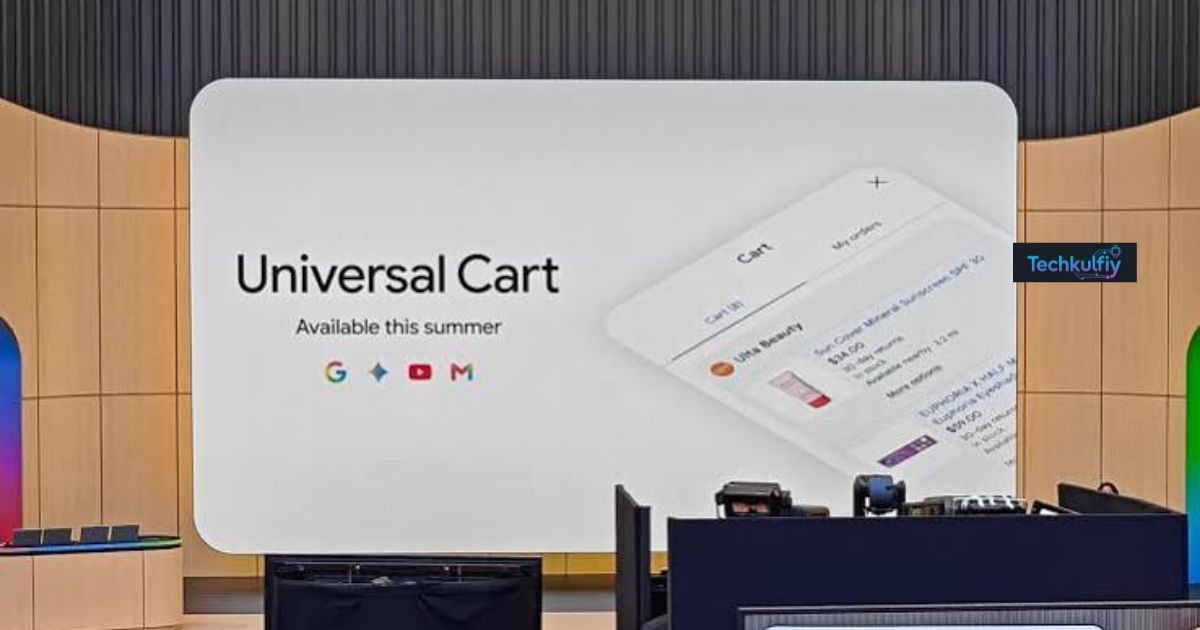
Google Universal Cart is Google’s new AI-powered shopping tool designed to make online shopping easier, faster, and more organized. Instead of saving products across multiple websites, opening dozens of browser tabs, or taking screenshots of items you want to purchase later, Google Universal Cart lets you collect supported products in one central shopping hub.
Launched in the United States in October 2026, Google Universal Cart works across Google Search and the Gemini app. It allows shoppers to save products from different retailers, monitor price changes, receive restock notifications, discover relevant promo codes, and explore convenient checkout options.
For online shoppers in the USA, Google Universal Cart could become a useful tool for comparing products and preparing for major shopping events such as Black Friday, Cyber Monday, and the holiday shopping season.
But how does Google Universal Cart work? Can it really help you save money? How do you add products, track discounts, and complete purchases?
In this complete guide, we will explain Google Universal Cart features, how to use Google Universal Cart, its benefits and limitations, supported shopping experiences, and practical tips for getting the most out of this new shopping technology.
What Is Google Universal Cart?
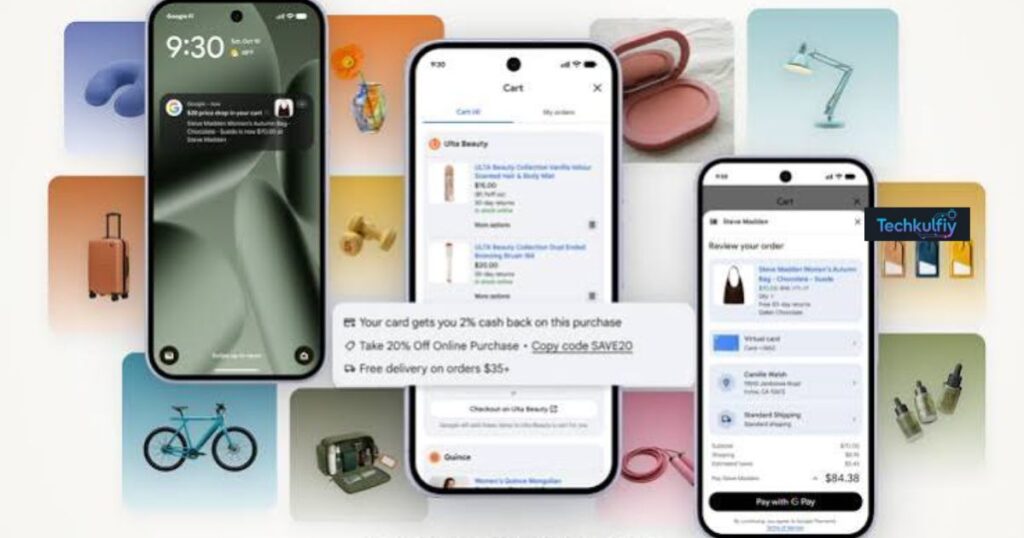
Google Universal Cart is an intelligent shopping cart that helps users save and manage products they discover through Google’s shopping experiences.
Traditional online shopping often requires customers to move between different retailers. You might discover headphones through Google Search, find a laptop on a retailer’s website, and save a pair of shoes while browsing another store. Keeping track of these products can quickly become confusing.
Google Universal Cart aims to solve this problem by providing one central place for supported shopping items discovered through Google services.
For example, imagine you are preparing for the holiday season. You find a television through Google Search, save a jacket while exploring shopping results, and discover a gift idea through the Gemini app. With Google Universal Cart, these products can be brought together in one place, making it easier to revisit your selections.
The cart also provides features that go beyond simply saving products. It can monitor price changes, alert you when certain items become available again, surface relevant promotions, and offer checkout options for participating merchants.
Google says its Universal Cart is powered by its Shopping Graph, which contains more than 60 billion product listings. This product information helps Google provide shopping details and monitor changes across supported listings.
The main goal of Google Universal Cart is to help shoppers discover, organize, compare, and purchase products without losing track of their shopping plans.
Google Universal Cart Launch Date and Availability
Google announced the US launch of Universal Cart on October 15, 2026. The feature is rolling out across Google Search and the Gemini app.
According to Google’s official announcement and support documentation, Universal Cart is currently available only in the United States.
This means shoppers in the US can begin looking for the feature in supported Google shopping experiences, although availability may vary during the rollout.
Where Can You Access Google Universal Cart?
Google Universal Cart supports product discovery through the following services:
- Google Search and Shopping: Discover products and save eligible items while researching purchases.
- Google AI Mode: Explore products through Google’s AI-powered search experience and save supported shopping selections.
- Gemini app: Discover products during shopping-related conversations and keep supported items in your cart.
Google previously discussed a broader shopping experience involving YouTube and Gmail. However, the October 2026 launch announcement specifically covers Search and Gemini. Users should not assume every previously previewed integration is already available.
For the latest information, visit Google’s official announcement at https://blog.google/products-and-platforms/products/shopping/universal-cart-launch/.
Google Universal Cart Features: What Can You Do With It?
Google Universal Cart includes several features designed to make online shopping more convenient. Here are the main capabilities shoppers should understand.
1. Save Products From Multiple Retailers
One of the biggest advantages of Google Universal Cart is the ability to collect supported products from different merchants in one central location.
Previously, shoppers often relied on browser bookmarks, screenshots, wish lists, and individual retailer carts to remember what they wanted to buy.
Google Universal Cart offers a more organized alternative.
For example, if you are shopping for a new home office, you might save a desk from one retailer, a monitor from another, and a chair from a third. Instead of searching for each product again, you can return to your Universal Cart to review your saved selections.
Products are organized by merchant, helping you see which retailer sells each item.
This feature can be especially useful when:
- Shopping for several people during the holidays.
- Comparing products before making an expensive purchase.
- Planning a home renovation or office upgrade.
- Collecting gift ideas over several days.
- Researching electronics, fashion, or household products.
Keep in mind that saving an item does not necessarily reserve its inventory or guarantee that its price will remain unchanged.
2. Track Price Drops Automatically
Price tracking is another important feature of Google Universal Cart.
Many shoppers delay purchases because they want to find a better deal. However, manually checking the same product every day takes time and can be frustrating.
Google Universal Cart can monitor supported products and notify users when prices drop.
For example, suppose you want to buy a laptop listed at $900. You are interested in the product, but you would prefer to purchase it at a lower price.
You can save the product in your Google Universal Cart and watch for a price-drop notification. If the listed price changes, Google may notify you so you can review the new offer.
This feature can be helpful for electronics, appliances, fashion, furniture, and other products whose prices fluctuate.
However, a price alert does not guarantee the lowest possible price. Retailers can change prices quickly, and a discount at one store might still be more expensive than a competitor’s offer.
Always compare the final price, shipping charges, return policies, and product specifications before purchasing.
3. Receive Back-in-Stock Notifications
Another useful feature of Google Universal Cart is availability monitoring for supported products.
Popular products can sell out during major sales, holiday shopping periods, or new product launches. Finding out when an item becomes available again can be difficult if you have to check the retailer manually.
Google Universal Cart can notify users when a saved product comes back in stock.
Imagine that you want to purchase a particular pair of sneakers, but your preferred size is unavailable. Instead of repeatedly opening the product page, you can save the item and watch for availability updates.
This may help shoppers follow limited-stock products and popular gifts.
Availability alerts are not reservations, however. Another customer may purchase an item before you complete checkout, so it is still important to act promptly when a suitable product becomes available.
4. Discover Promo Codes and Discounts
Google Universal Cart can surface relevant promotional codes alongside saved products.
Promo codes may offer percentage discounts, fixed-dollar savings, or other benefits depending on the retailer and the offer’s conditions.
For example, you might save a jacket and later see a relevant promotional offer in your cart. Before checking out, you can review the offer and determine whether it applies to your selected product.
This can reduce the time spent searching the internet for discount codes.
Nevertheless, shoppers should always review the conditions of a promotion. Some codes require a minimum purchase, exclude certain products, or apply only to new customers.
A displayed promotion is not a guarantee that every shopper or every product qualifies.
5. Get Credit Card Rewards Insights
Google Universal Cart also connects with Google Wallet to provide insights about eligible payment-card benefits.
For shoppers who use multiple credit cards, remembering which card offers the best rewards for a particular purchase can be difficult.
Depending on your Wallet settings and available offers, Google Universal Cart can identify relevant card rewards or merchant benefits associated with saved products.
To use these insights, Google’s support documentation says users need at least two credit cards saved in Google Wallet and Wallet personalization enabled.
For example, one card might offer rewards for shopping at a particular merchant, while another card might provide a different benefit.
Google Universal Cart can help highlight these opportunities, but you remain responsible for selecting your preferred payment method.
Card rewards and promotions are determined by the relevant payment providers and remain subject to their terms.
6. Complete Purchases Through Supported Checkout Options
Google Universal Cart provides two main ways to complete a purchase.
Checkout with Google Pay: For participating merchants, eligible purchases can be completed through Google using supported saved payment methods.
Checkout on the merchant’s website: For other merchants, Google can transfer your selected items to the retailer’s website so you can complete the purchase there.
This flexibility helps shoppers move from product discovery to checkout without always having to rebuild their shopping cart manually.
Participating retailers and available checkout features may vary. The retailer remains the seller of record, meaning customers should contact the merchant for relevant order support, returns, and product issues.
How to Use Google Universal Cart: Step-by-Step Guide
If you want to try Google Universal Cart, follow these steps to find the feature and manage your shopping items.
Step 1: Open Google Search or the Gemini App
Start by opening Google Search, Google Shopping, or the Gemini app.
Make sure you are using a supported shopping experience. Since the current rollout is limited to the United States, users in other countries may not see the feature.
Step 2: Search for a Product
Enter the name of the product you want to buy.
For example, you might search for:
- Best laptops under $1,000.
- Wireless headphones for travel.
- Affordable office chairs.
- Holiday gifts for family members.
- Running shoes for everyday use.
Review the available shopping results and product information before deciding which items interest you.
Step 3: Save the Product to Your Universal Cart
When you find a supported product, use the available shopping controls to add or save it to your Universal Cart.
The exact interface may vary depending on the Google service and your account’s access to the feature.
Repeat the process for other products you want to consider, including items from different retailers.
Step 4: Open and Review Your Cart
Return to your Universal Cart to review your saved products.
Products are organized by merchant, helping you identify where each item is sold.
Review product details, prices, and other available information. Remove items you no longer want to consider.
Remember that saving a product is different from purchasing it, and saved products may still change in price or availability.
Step 5: Monitor Prices and Stock
Once products are saved, Google Universal Cart can provide relevant price-drop and availability notifications.
Check your Google app notification settings and Google Account communication preferences if you want to manage these alerts.
When a price drops, compare the new offer with other retailers rather than automatically assuming it is the best deal.
Step 6: Review Promotions and Payment Benefits
Before purchasing, check whether your cart displays relevant promotional codes or eligible credit card rewards.
Review any conditions associated with the offer.
You can also compare available payment methods to determine which one best suits your needs.
Step 7: Complete Your Purchase
When you are ready to buy, choose the available checkout option.
Depending on the merchant, you may be able to complete the transaction with Google Pay or continue to the retailer’s website.
Verify the product, size, color, quantity, shipping address, taxes, delivery costs, and final price before confirming the order.
Important: Google’s Universal Cart does not mean that every merchant supports the same checkout process. Always check the final order details on the payment or retailer checkout screen.
Can Google Universal Cart Help You Save Money?
Google Universal Cart can help shoppers identify savings opportunities, but it does not guarantee that every purchase will be cheaper.
Its main advantage is convenience: it brings saved products, price monitoring, promotional offers, and payment insights together.
Here are several ways to use Google Universal Cart more effectively.
Compare Prices Before Buying
When a price alert arrives, compare the updated price with other retailers.
A product with a discount may still cost more than a similar product elsewhere, especially when shipping fees and taxes are included.
Set a Shopping Budget
Before adding products to your cart, decide how much you are willing to spend.
Keeping several products together makes it easier to review your shopping plans, but it can also encourage unnecessary purchases if you save too many items.
Avoid Impulse Buying
A saved cart can help you delay purchases while comparing alternatives.
Instead of buying an item immediately, leave it in your cart and consider whether you genuinely need it.
Review Promotional Conditions
Always read the terms of coupons and rewards.
A discount may require a minimum order value or may exclude certain items. Compare the total cost after applying eligible offers.
Use Price Alerts for Major Purchases
Price monitoring may be particularly useful for expensive purchases such as laptops, televisions, appliances, and furniture.
For these products, even a modest discount can make a meaningful difference to the total cost.
Google Universal Cart vs. Traditional Online Shopping Carts
How is Google Universal Cart different from the shopping carts you already use?
A traditional retailer shopping cart usually contains products from one store. If you shop at three retailers, you generally manage three separate carts.
Google Universal Cart is designed to organize supported products from multiple merchants across Google shopping experiences.
| Feature | Google Universal Cart | Traditional retailer cart |
|---|---|---|
| Products from multiple merchants | Yes, across supported shopping experiences | Usually limited to one retailer |
| Shared shopping hub across Google services | Yes | Generally no |
| Price-drop notifications | Available for supported products | Depends on the retailer |
| Restock notifications | Available for supported products | Depends on the retailer |
| Promotional insights | Relevant offers may appear | Depends on the retailer |
| Checkout | Google Pay or retailer website, where supported | Usually the retailer’s website or app |
Google Universal Cart does not eliminate the need for retailer websites. You may still need to visit a merchant to complete a purchase, review specific policies, or manage a return.
Its key difference is that it connects product discovery and shopping organization across supported Google services.
Google Universal Cart vs. Shopping on Gemini
Google Universal Cart and Gemini work together, but they are not the same thing.
Gemini is Google’s AI assistant, which can help users explore products, ask shopping questions, and discover options through conversational prompts.
Universal Cart is the shopping hub that helps organize saved products across supported Google experiences.
For example, you could ask Gemini to suggest a laptop for college, explore the available recommendations, and save a suitable product to your cart if the relevant feature is supported.
You could later review that product alongside other items you saved through Google Search.
This combination makes Google Universal Cart particularly interesting for people who prefer conversational product discovery instead of manually navigating numerous websites.
However, AI-generated product recommendations should still be checked carefully. Confirm specifications, compatibility, reviews, warranty details, and seller reliability before spending money.
Pros and Cons of Google Universal Cart
Pros
- Centralized shopping: Keep supported products from different merchants in one place.
- Convenient product discovery: Save items from Google Search and Gemini.
- Price monitoring: Receive notifications when supported products become cheaper.
- Availability alerts: Follow products that may come back in stock.
- Promotional insights: Discover relevant promo codes and eligible card rewards.
- Flexible checkout: Use Google Pay or continue to a merchant’s website where supported.
- Better organization: Review shopping ideas without relying on screenshots and scattered browser tabs.
Cons
- Limited geographic availability: The current launch is restricted to the United States.
- Gradual rollout: Not every eligible user may immediately see every feature.
- Merchant limitations: Checkout and product support vary between retailers.
- No guaranteed savings: A price drop does not necessarily mean the lowest market price.
- Notification management: Frequent alerts may become distracting if you save many products.
- Privacy considerations: Shopping and order information may be handled across connected Google services.
- Not a replacement for retailer support: Product returns, warranties, and many order issues remain the merchant’s responsibility.
Is Google Universal Cart Safe to Use?
Google Universal Cart is intended to help users organize shopping and complete supported purchases through Google Pay or retailer websites.
Google’s support documentation explains that cart information is saved in Google Wallet and provides settings for managing notifications and relevant personalization features.
As with any online shopping service, users should understand what information is associated with their account.
Here are some sensible precautions:
- Review your Google Account and Wallet privacy settings.
- Use a strong password and enable additional account security protections.
- Check the retailer’s website address before entering payment information.
- Review the total amount and payment method before confirming an order.
- Read the merchant’s return and refund policies.
- Manage shopping notifications if you no longer want price or availability alerts.
- Review the information provided by Google and your payment provider about rewards and personalization.
For supported purchases made through Google Pay, follow Google’s payment guidance. For purchases completed on a retailer’s website, check the retailer’s security practices and order confirmation.
No online service removes every possible risk. Shopping carefully and verifying transaction details remain important.
Google Universal Cart Availability Outside the USA
One of the most common questions about Google Universal Cart is whether shoppers outside the United States can use it.
As of October 2026, Google’s official support documentation lists Universal Cart as available only in the United States.
This means users in countries such as Pakistan, the United Kingdom, Canada, and Australia should not assume the complete Universal Cart experience is available to them.
Google has discussed expanding other shopping and checkout capabilities internationally, but plans for related services should not be confused with confirmed availability of the complete Universal Cart feature.
If you live outside the United States, you can continue using locally available Google Shopping features and retailer wish lists while monitoring Google’s official announcements.
For users in Pakistan, availability may depend on Google’s supported markets, account eligibility, and the specific shopping feature being offered. Do not change your account region or payment details simply to access a feature unless you understand the applicable requirements.
Frequently Asked Questions About Google Universal Cart
1. What is Google Universal Cart?
Google Universal Cart is an AI-powered shopping hub that lets users save and manage products discovered through supported Google services, including Search and Gemini. It also offers price monitoring, availability notifications, promotional insights, and checkout options for participating merchants.
2. When did Google Universal Cart launch?
Google announced the US rollout on October 15, 2026. The feature is rolling out through Google Search and the Gemini app.
3. Is Google Universal Cart free?
Google’s announcement describes Universal Cart as a shopping feature but does not list a separate subscription fee for using the cart. Users should check the official terms and any applicable retailer, payment, or product costs.
4. How do I use Google Universal Cart?
Open a supported Google shopping experience, find a product, and use the available controls to save it to your cart. You can then review saved items, monitor supported price and stock changes, check offers, and choose an available checkout option.
5. Can Google Universal Cart track price drops?
Yes. Google says Universal Cart can monitor supported products and notify users about price changes. However, the alerts do not guarantee the lowest available price.
6. Can I shop at multiple stores with Google Universal Cart?
Yes. Universal Cart is designed to organize supported products from different merchants in one place. Checkout options depend on the participating merchant.
7. Does Google Universal Cart work with Gemini?
Yes. Google Universal Cart supports product discovery and saving through the Gemini app, alongside Google Search and AI Mode. Some cart-management functions may not be available directly within a Gemini conversation.
8. Is Google Universal Cart available in Pakistan?
Google’s official support documentation currently lists Universal Cart as available only in the United States. Shoppers in Pakistan should check official Google updates for future availability.
9. Does Google Universal Cart automatically buy products?
Saving a product or receiving a price alert does not automatically purchase it. Users can review their selections and choose an available checkout method when they are ready to buy.
10. Is Google Universal Cart better than Amazon’s shopping cart?
The tools serve somewhat different purposes. Google Universal Cart focuses on collecting supported products across Google shopping experiences and multiple merchants. Amazon’s cart primarily supports purchases through Amazon’s marketplace. The better option depends on where you shop and which features matter most.
Final Verdict: Is Google Universal Cart Worth Using?
Google Universal Cart introduces a practical approach to organizing online shopping. Instead of keeping separate lists and repeatedly searching for products, shoppers can save supported items across Google Search and Gemini, monitor price changes, receive restock alerts, and review promotional opportunities in one place.
For US shoppers preparing for holiday purchases, comparing expensive electronics, or collecting gift ideas from different retailers, Google Universal Cart could make the shopping process more manageable.
Its strongest features are centralized product organization, price monitoring, and the flexibility to complete eligible purchases through Google Pay or a retailer’s website.
However, users should remember that not every merchant supports the same features, price alerts do not guarantee the lowest prices, and the complete experience is currently limited to the United States.
Overall, Google Universal Cart is worth exploring if you regularly compare products across multiple stores. Used thoughtfully, it can help you organize shopping decisions, keep track of potential discounts, and spend less time searching for products you have already found.
